

Coding is a never-ending battle against complexity. On some days, you feel like you’re making progress against the odds, while on others, it seems the odds are winning, and you are sinking deeper into an ocean of confusion. Sound familiar? AI assistance tools like JetBrains AI Assistant and GitHub Copilot can help you write better code, save time, and improve your workflow so you can tackle coding challenges with more confidence. This blog will offer a comparison of JetBrains AI Assistant vs Copilot to help you choose the right tool for your coding objectives based on your preferred IDE.
Horizon’s AI Desktop Assistant can make your coding life a whole lot easier. Whether you choose JetBrains AI Assistant or GitHub Copilot, this blog will help you pick the right AI coding assistant to improve your workflow, save you time, and help you write better code.
What are Github Copilot and Jetbrains AI Assistant?
JetBrains AI Assistant and Copilot are innovative tools designed to assist developers in their coding tasks. These AI-powered assistants offer a range of features to streamline the coding process and improve efficiency. They help make coding easier and more fun, especially for those who are just starting or looking to improve their skills.
What is JetBrains AI Assistant?
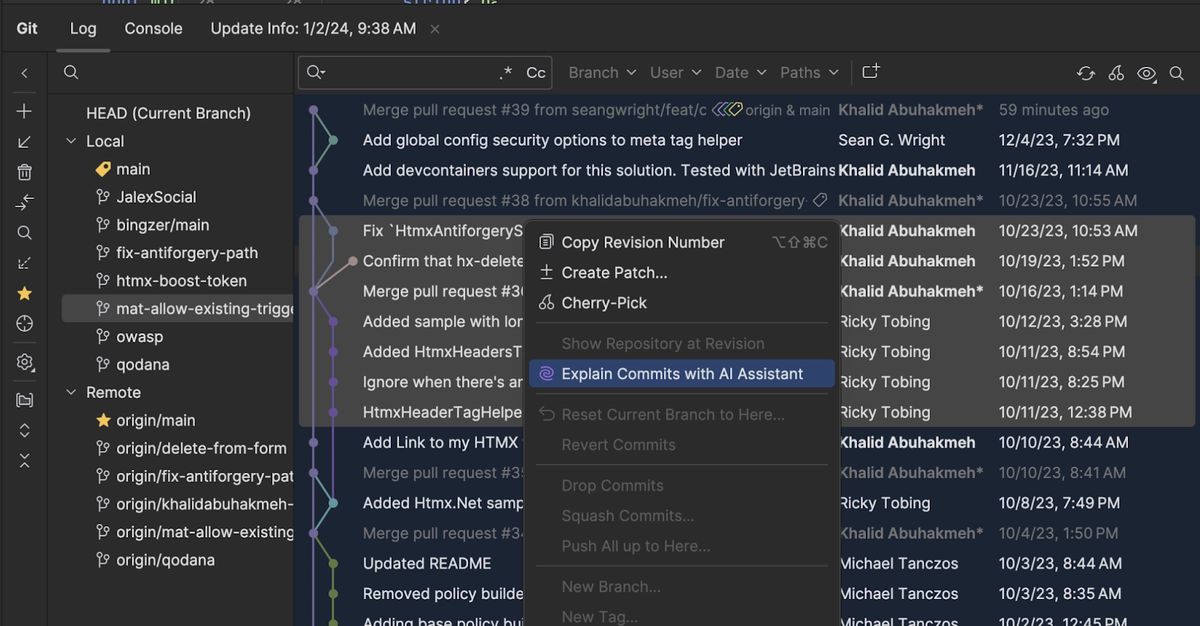
JetBrains AI Assistant is an innovative tool created by JetBrains, a company famous for making software that helps programmers write better code. This assistant is built right into popular JetBrains software like IntelliJ IDEA and PyCharm. This means that if you’re using one of these tools, JetBrains AI Assistant will be there to help you every step of the way.
What is Copilot?

On the other hand, Copilot is developed by GitHub and OpenAI. It’s like having a super-smart friend who knows a lot about coding and is always ready to help.
Copilot works well with GitHub repositories, where people share their code. This makes Copilot an excellent choice for teamwork and collaboration.
How Can They Benefit You?
Both JetBrains AI Assistant and Copilot can make coding easier by providing helpful suggestions and speeding up your workflow. Whether you’re writing a simple program or a complex application, these tools can enhance your coding experience. Let’s dive deeper into their key features.
Key Features
JetBrains AI Assistant and Copilot both provide code suggestions, auto-completion, and error detection to help developers write cleaner and more efficient code. These tools analyze the context of the code being written and offer intelligent suggestions based on best practices and common coding patterns.
Pros and Cons of JetBrains AI Assistant
Pros
- Deep integration with JetBrains IDEs
- Advanced refactoring and code analysis
- Documentation and test case generation
- Context-aware recommendations
Cons
- Limited to the JetBrains ecosystem
- May not perform well with all languages
- Occasional issues with inline suggestions
- Integration may disrupt other IDE features
Code Suggestions
When you start typing code, sometimes it’s hard to remember exactly what you need. That’s where these assistants come in! They can suggest what to write next, which saves you time and helps you avoid mistakes.
JetBrains AI Assistant
This tool is good at understanding what you’re trying to do. It looks at the code you’ve already written and suggests the following steps, making sure you’re following the best coding practices.
Copilot
Copilot takes things a step further by analyzing a massive amount of code from the internet. It can suggest whole lines or blocks of code, which can be super helpful when you’re stuck.
Auto-Completion
Both tools can finish your code for you, which is like having a partner that knows what you want to say. This means you can write code faster and with fewer errors.
JetBrains AI Assistant
It provides smart auto-completion that considers the context of your code. This means it’s not just guessing; it’s making informed suggestions based on what you’ve already done.
Pros and Cons of GitHub Copilot
Pros
- Supports multiple IDEs and editors
- Rapid and accurate inline suggestions
- Strong multilingual support
- Useful chat and refactoring tools
Cons
- Requires a separate subscription
- Licensing concerns for generated code
- Occasionally provides non-contextual output
- Some features still in beta
Copilot
Copilot also offers auto-completion, but does so by examining many different coding examples. This helps it suggest options that are relevant and useful.
Error Detection
Mistakes happen, especially when you’re coding! Both JetBrains AI Assistant and Copilot help catch errors before they become bigger problems.
JetBrains AI Assistant
This tool is excellent at identifying mistakes and suggesting fixes. It helps you learn from your errors, making you a better coder over time.
Copilot
While Copilot is also good at spotting mistakes, it focuses more on providing suggestions for improvements rather than just fixing errors.
Related Reading
- Best AI Personal Assistant
- Best AI Coding Assistants
- Best AI Scheduling Assistant
- Best AI Voice Assistant
- Best AI Tools for Product Managers
- Best AI Tools for College Students
- Best AI Recruiting Tools
- AI Tools for Literature Review
- Best AI for Essay Writing
In-Depth JetBrains AI Assistant vs Copilot Comparison

While both tools offer similar features, they have distinct strengths. JetBrains AI Assistant is known for its deep integration with:
- IntelliJ IDEA
- PyCharm
- Other JetBrains products
This means if you’re using those tools, you’ll have a seamless experience. Copilot, developed by GitHub and OpenAI, offers strong integration with GitHub repositories and a collaborative coding environment for teams. This makes it especially appealing for group projects where multiple people are working on the same code.
Accuracy and Relevance of Suggestions
The accuracy and relevance of the suggestions provided by these AI assistants are crucial for developers. JetBrains AI uses a narrower context to offer coding recommendations specifically tailored to the developer’s working environment.
GitHub Copilot casts a broader net by scanning publicly available code for patterns. This can result in some impressive code generation, but suggestions may not always fit the context appropriately. Initial hands-on testing suggests JetBrains AI recommendations align more accurately with immediate coding needs. But GitHub Copilot appears more adept at generating whole code blocks from comments.
Integration with Development Environments
Ease of integration into existing workflows is another key consideration when evaluating these tools. JetBrains AI has tight integration with JetBrains IDEs, like:
- IntelliJ
- PyCharm
- WebStorm
Its suggestions are explicitly tuned to these environments. GitHub Copilot, as a plugin for editors like Neovim and Visual Studio Code, can integrate with a broader range of setups. But the suggestions may not be as precisely tailored. So developers already using JetBrains IDEs may find that JetBrains AI seamlessly slots into their stacks. Those using other editors may favor GitHub Copilot for flexibility.
Code Responsibility and Licensing
An ongoing concern around AI coding tools pertains to code responsibility, who owns the output, and what licenses apply? JetBrains AI maintains clear attribution of generated code to the tool itself. The output is meant as a suggestion to aid the developer’s work.
GitHub Copilot’s licensing is more complex. Its code output is considered a derivative work of its training data, making open-source licensing ambiguous in some cases. This has sparked some debate in the community. For those wanting full ownership and rights over generated code, JetBrains AI is more straightforward. But GitHub Copilot provides robust code generation that developers can customize.
Language and Framework Support
Another key consideration is which languages and frameworks these AI assistants support. JetBrains AI is currently focused on Java, with plans to expand to Kotlin and Python. So it offers specialized suggestions for JVM-based languages. By contrast, GitHub Copilot supports dozens of languages, including:
- Python
- JavaScript
- TypeScript
- Ruby
- C++
Its broad training gives it multi-language support in a single tool. So for now, GitHub Copilot provides more flexibility for developers working across multiple languages. But JetBrains AI goes deeper into core languages like Java.
Pricing and Availability
Pricing often plays a significant role when selecting developer tools. JetBrains AI and GitHub Copilot take markedly different approaches here. JetBrains AI is available at no additional cost for current subscribers of JetBrains IDEs like IntelliJ IDEA Ultimate.
Non-subscribers can access a preview version to evaluate the tool. GitHub Copilot, after a lengthy technical preview, is now offered as a paid service with monthly and annual subscriptions.
Free Usage Tiers are Limited
Educational and open-source discounts are available. This makes JetBrains AI more affordable for those who have already bought into the JetBrains ecosystem. GitHub Copilot may make more sense for developers using other editors and wanting robust code generation capabilities.
Performance Impact and System Resources
AI coding assistants place additional demands on hardware resources an important consideration, especially for larger projects. JetBrains AI has proven quite performant even for sizable codebases. Its optimizations for JetBrains IDEs give it an edge.
GitHub Copilot is more resource-intensive due to its complex models scanning extensive training data to generate suggestions. Performance issues have been reported in some cases. So developers working on complex projects with tighter performance requirements may favor JetBrains AI. Those with more capable hardware can better leverage GitHub Copilot’s extensive capabilities.
Security and Privacy
As with any software tool accessing sensitive code, security and privacy protections are paramount for AI coding assistants. JetBrains AI offers assurances that all processing occurs on-device without cloud syncing or telemetry. User data and generated code stay entirely local.
GitHub Copilot’s privacy policy allows analyzing anonymous telemetry to improve the tool. Developers can opt out of additional data sharing, but some metadata is unavoidably collected. So for those wanting air-tight security, JetBrains AI again aligns more closely with typical developer expectations. GitHub Copilot trades some privacy for more advanced AI training.
Performance and User Experience
Performance is a key factor when evaluating coding assistants. GitHub Copilot excels with its seamless suggestions that flow naturally as you code. This creates an almost intuitive experience for developers.
JetBrains AI Helpers shine in contextual understanding. It analyzes your project’s structure and provides tailored recommendations. Users often appreciate how it adapts to various coding styles.
Lag Can Be Frustrating During Intense Coding Sessions
Copilot generally maintains speed, but users report occasional hiccups depending on project complexity. JetBrains tends to perform consistently without noticeable delays, enhancing productivity significantly. Personal preference greatly affects which assistant feels more natural for users’ workflows.
Ease of Use and Learning Curve
GitHub Copilot has a user-friendly design. It appeals to both new and experienced developers. The learning curve is relatively gentle.
Users can quickly grasp how to leverage suggestions without extensive setup. The intuitive interface lets coders be productive right away. It helps them feel supported from day one.
JetBrains AI Helper is for Seasoned Pros
They should be familiar with JetBrains’ ecosystem. While its advanced features offer depth, new users might find themselves overwhelmed initially.
Once used to the tools and settings, many appreciate its power. Tutorials and community support enhance the onboarding experience as well. Ease of use varies significantly between the two platforms. It depends on users’ experiences and programming backgrounds.
Impact on Speed and Quality of Code Writing
Popular AI encoding assistants like GitHub Copilot and JetBrains AI Helper boost speed. Their impact is undeniable. Developers often find themselves able to write and debug faster than ever before.
These tools suggest snippets in real-time, reducing the time spent on routine tasks. Quality also benefits significantly from these intelligent suggestions. They provide context-aware recommendations. This helps catch errors early in development. This leads to cleaner, more maintainable code.
Reliance on AI Can Create Challenges
Some developers might skip critical thinking processes by accepting suggestions blindly. This is a balancing act, much like the debate in the framework world between NestJS vs NextJS, where both offer unique advantages but require careful consideration for the specific needs of a project.
It is vital to balance using these tools for efficiency and a deep understanding of their logic. As teams integrate these assistants into their workflow, collaboration improves as well.
Integration with Different IDEs
GitHub Copilot shines in its versatility. It works well with popular editors, like Visual Studio Code, Neovim, and JetBrains. This flexibility lets developers improve their coding experience. It works in any environment they prefer. JetBrains AI Helper is for JetBrains’ tools, like IntelliJ IDEA and PyCharm.
The Integration is Seamless
Users can use AI without disrupting their workflow. Both helpers focus on code completion and suggestions. Their context differs due to the IDE’s capabilities. GitHub Copilot works well in more settings.
But it may lack depth in JetBrains environments compared to its native assistant. Your choice may hinge on which IDE you use most frequently. That could determine which tool feels more intuitive for your development needs.
Usage and Integration
GitHub Copilot shines in popular code editors, like VS Code. Developers can start coding right away. It suggests lines and snippets in real-time.
This intuitive setup enhances workflow and keeps focus intact. It often comes down to personal habits and preferred programming environments. It’s not just about functionality. Each tool has found its niche among developers eager for efficient coding.
Using GitHub Copilot in Different Programming Languages
GitHub Copilot shines when it comes to versatility across various coding languages. Whether you’re writing Python scripts or JavaScript apps, it will help you. Its adaptive learning large language models are the reason.
For Python devs, Copilot gives innovative suggestions. They improve data tasks. It understands libraries like NumPy. In JavaScript, it excels at predicting patterns in frameworks like React and Node.js. This can significantly speed up development time while ensuring code quality.
Integration of JetBrains AI Assistant with Popular IDEs
The integration provides real-time code suggestions and context-aware help. It learns from your coding style over time, making it increasingly intuitive.
This tailored approach means you get relevant tips just when you need them. JetBrains’ ecosystem supports many languages out of the box.
The AI Helper Doesn’t Give Generic Advice
It adapts its guidance to the specific language. Developers appreciate how easily they can switch between projects without losing functionality. Each JetBrains tool keeps its unique features. It also benefits from AI enhancements.
This not only boosts productivity but also improves the development environment. AI-powered suggestions for commit message generation can streamline the version control process and improve code clarity.
Related Reading
- AI Language Learning Tools
- AI for Grant Writing
- AI Tools for Executive Assistants
- AI Tools for Financial Advisors
- AI Tools for Journalists
- Best AI for Medical Students
Try Horizon for Free − Experience the Future of Work Today
Meetings can be a drag. You have to sit still for long periods, keep your mind on the discussion at hand, and then, if that wasn’t bad enough, take notes. Horizon erases the need to take notes in meetings and lets you focus on what matters: “the conversation itself”.
The first time you use Horizon, you’ll feel like you have superpowers. This AI assistant listens to:
- Your meetings
- Transcribes discussions live
- Generates summary notes, prompts
- Actionable follow-ups
All visible to you alone. No more frantic note-taking or lost details. Horizon’s seamless prompts and confidential notes keep you sharp while staying completely undetectable. Discover a new level of productivity and confidence in any meeting.
Experience Horizon today.
Related Reading
Want more insights like this?
Subscribe to get short productivity tips and useful summaries of new tools every week.
Want more insights like this?
Subscribe to get short productivity tips and useful summaries of new tools every week.


