The best Even G2 apps right now are the small ones that save you a phone check: Weather, Books, Navigaze and a memory or meeting app for work. Below are the 10 Even G2 apps worth installing first from Even Hub, what each one costs, and what each one needs before it works.
Key takeaways
- Best for work memory and meetings: Constella (our app). It answers from your own email, notes and past meetings, and shows cues during calls.
- Best for live conversations: IRIS. It listens to the talk in front of you and suggests what to say.
- Best free everyday apps: Weather and Books. No account, no setup, nothing to pay.
- Best for getting around: Navigaze. Turn-by-turn arrows on the lens, free for the basics.
- Watch the setup: many AI apps need your own API key, a home computer left on, or both. Check before you install.
Updated November 2026. App prices and versions were checked on the live Even Hub store on November 11, 2026.
Quick picks: the 10 best Even G2 apps at a glance
Say it is your first week with Even G2. You take the train to work, you have three or four calls a day, and you like to read before bed. You have ten minutes to set up the Hub. This table is for that moment.
| # | App | Maker | Best for | Price (as of Nov 2026) | Extra setup? |
|---|---|---|---|---|---|
| 1 | Constella (AI Second Brain) | Constella App, Inc. (us) | Answers and meeting cues from your own email and notes | Free install; plans $19.99 or $39.99 a month, or a free tier | Sign in, connect your apps |
| 2 | IRIS | Sufi | Help during live conversations | $14.99 a month after 3 free days, or free with your own keys | None on Pro |
| 3 | OcuClaw | Akelu | Running your own AI agent | No fee listed; you pay for your own models | Yes: OpenClaw, relay, keys |
| 4 | Navigaze | Sufi | Turn-by-turn directions | Free; Pro $4.99 a month | None |
| 5 | Books | Nick Ustinov | Reading free classics and your ePubs | Free | None |
| 6 | Weather | Nick Ustinov | A quick forecast | Free | None |
| 7 | Messages (Message Lens) | Thibaut Rey | WhatsApp, Signal, Telegram | No fee listed | Yes: Beeper Desktop at home |
| 8 | DocuLens | Jeroen Ceyssens | PDFs and course notes | No fee listed | Upload files first |
| 9 | ER Workout | F3TCH | Sets, reps and rest timers | No fee listed | None |
| 10 | DisplayPlus Music | Oliemanq | Now playing and lyrics | Free; Spotify Premium for controls | Link Spotify |
What is Even Hub?
Even Hub is the app store for Even Realities G2 glasses. It lives as a tab inside the Even app on your phone. You tap Install there, and the app shows up in the glasses menu.
It started small. In December 2025, Even Realities posted a pilot program on Reddit for "a small, early-access cohort for developers." The public launch came in spring 2026. Android Authority reported "nearly 50 apps and plug-ins" and about 2,000 developers at the time. On launch week, Tech with Spencer went through the whole store and counted "only 38 apps on here right now."
It has grown a lot since. In October 2026, Even put the store on the web at the Even Hub catalogue, so you can look around before you own glasses. A community list on GitHub, awesome-even-realities-g2, tracks more than 250 G2 apps people have shared.
One thing shapes every app on this list. The tools are narrow on purpose. Even's own Insider blog describes them: a 576 by 288 pixel green screen, four gestures (tap, double tap, swipe, long press), and apps that run through the phone. One owner on Reddit put the catch simply: "The apps are technically 'plugins'... you still can only run them one at a time."
So the apps that last are the ones you can use in a glance. A forecast. A page of a book. A turn arrow. The ones that try to act like a phone get deleted.
How we ranked these apps
We used three sources, and each app had to show up in at least two:
- The Hub itself. On November 11, 2026, we pulled Even Hub's Editor's choice, Trending and Community rows. Trending that day was led by Weather, OcuClaw, DisplayPlus Music, Navigaze and Books.
- Owners. We read four of the biggest "which apps do you actually use?" threads on r/EvenRealities, from May to October 2026. Books, Weather, IRIS and Navigaze came up again and again.
- Video. Tech with Spencer's tour of the first 38 apps and his OcuClaw setup guide show what apps look like on the lens and how long setup takes.
Then we asked one question about each app: will a normal owner still open it a month from now? Price, setup work and how often the job comes up all fed into that.
We make Constella, so weigh our pick accordingly. It is first because of the job it does for people with busy inboxes and many calls. It gets the same block as every other app below, with its real limits.
The 10 best Even G2 apps, ranked
Every entry uses the same shape: who it is for, what it does, the price, the real limit, and when to pick something else.
1. Constella (AI Second Brain): best for work memory and meetings
Best for: people with a busy inbox and several calls a day.
Constella (our app) links your Gmail, Calendar, Drive, Notion, Slack and past meetings into one memory. You tap and ask out loud, "What did they want before renewing?", and the answer comes to the lens with where it came from. In a meeting, you double-tap to start captions, and short cues from your own history with that person come up above them. After the call, the meeting is saved with a title, a summary and tags. It also brings up only the emails that need you, lets you say a reply (nothing sends until you tap), and can hand jobs to agents like OpenClaw, Claude Code or Codex that report back on the lens.
In our first-week scenario, this is the app for the 2 pm call. You ask "Who am I meeting at 2?" on the walk from the train, and the lens shows who they are and what they asked for last time.
Price: free to install. Plans are $19.99 a month (14 days free), $39.99 a month with your own cloud computer (3 days free), or a free tier with no card if you run your own agents on a Mac.
Real limit: it only knows what you connect. A new account with no email or notes linked has little to say. It works on Even G2 only, needs your phone nearby with the Even app, and its lens menus are in English.
Pick IRIS instead if you mostly want help in the conversation in front of you and do not want to connect your inbox. Pick OcuClaw instead if you already run your own OpenClaw and want full control. Hub page
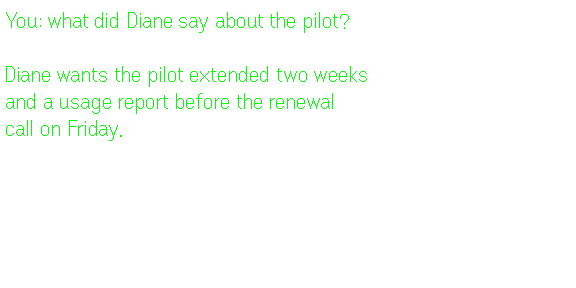 Real lens capture: a question asked out loud, answered from the wearer's own notes.
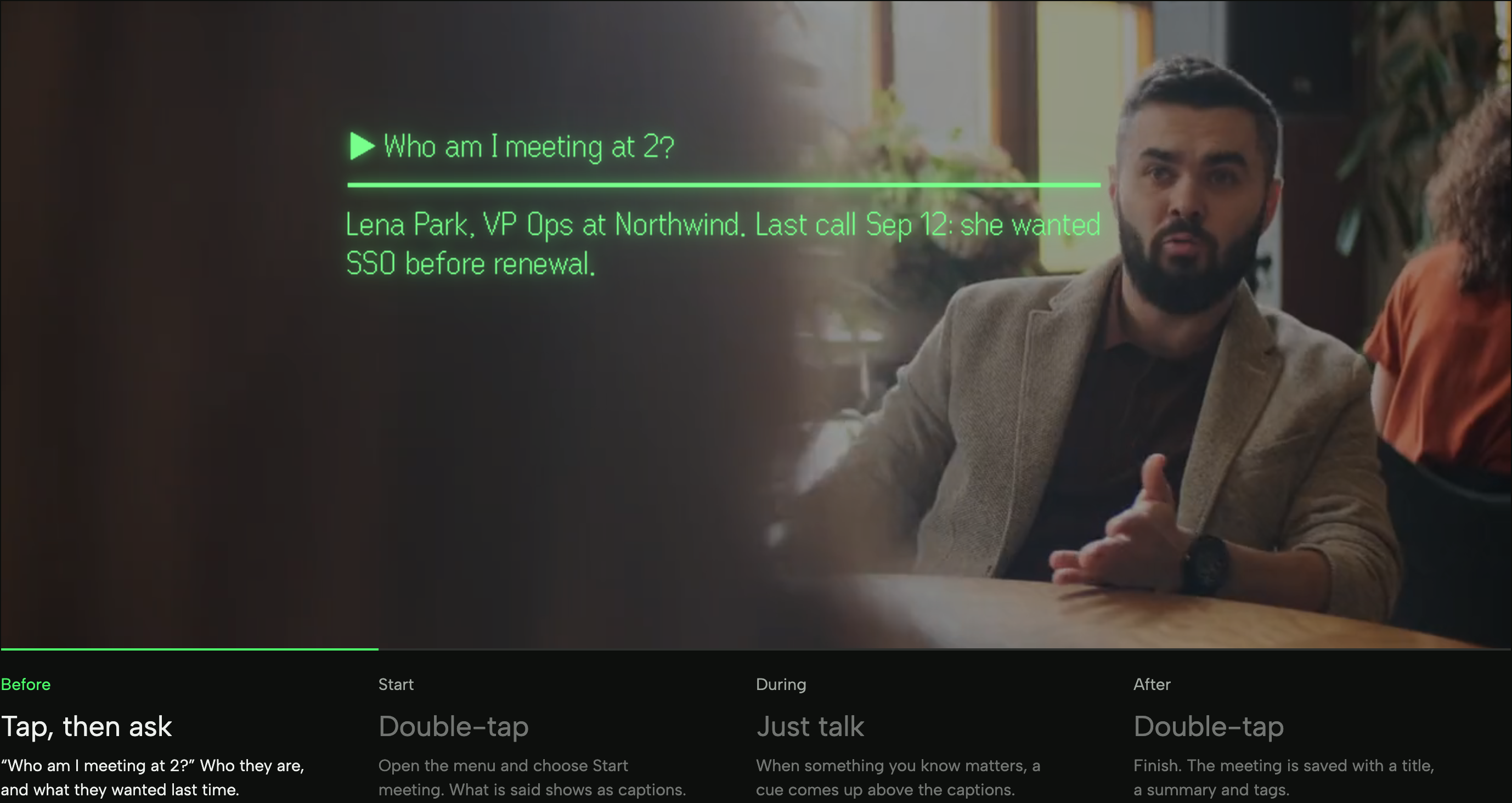 From our glasses page: the before, during and after steps of a meeting on the lens.
2. IRIS: best for live conversations
Best for: people who want help with what is being said right now.
IRIS, by Sufi, listens to a conversation and, in its maker's words, "puts the right words on your lens while you talk, and remembers it all for next time." It knows who said what. On a Meet, Zoom or Teams call in Chrome, it can hear the other side too, so the summary covers everyone. Its latest update makes every answer say whether it was checked on the web, with sources, or could not be checked.
Owners like it. One wrote on Reddit that it "Gets better by the day with a super responsive developer." Another listed their top apps as "IRIS, Weather, PitchBoost, Books. In that order for me."
Price: IRIS Pro is $14.99 a month after a 3-day free trial. You can also connect your own AI and speech keys and pay nothing to IRIS. A bundle with Navigaze Pro is $17.99 a month.
Real limit: it is built around the conversation happening now. It does not read your inbox or your old documents.
Pick Constella instead if you want answers from last month's email thread, not only from today's talk. Hub page
3. OcuClaw: best for running your own AI agent
Best for: tinkerers who already use OpenClaw or Hermes.
OcuClaw, by Akelu, puts your own AI agent in your glasses. It works with OpenClaw and Hermes, on your computer or in the cloud, with models from OpenAI, Anthropic, Google and others. Say the wake word and your agent answers. Version 2.1 added a board where each agent gets its own job, and the glasses tell you when one is done or stuck. It sits in Even's Editor's choice row and was second on Trending.
Price: the Hub lists no fee. You run your own OpenClaw and pay for your own model and speech keys. In his setup video, Tech with Spencer says his speech key cost him "only a few cents."
Real limit: setup. Spencer admits, "the first time I tried to connect Open Claw to my Even Reality's G2 smart glasses, I had no idea what I was doing." His guide walks through OpenClaw, a relay token, Tailscale and a speech key. One Reddit owner said it took about three hours.
Pick Constella or IRIS instead if you want an AI app working tonight, without a server. Hub page
4. Navigaze: best for getting around
Best for: walkers, cyclists and drivers.
Navigaze, also by Sufi, puts turn-by-turn directions on the lens for driving, motorcycles, bikes, walking and transit. You search an address or paste a map link, pick from up to three routes, and go. The lens shows the next turn, your speed and the speed limit, around the edge so the middle of your view stays clear.
In our scenario, this is the walk from the station to the office. Phone in your bag, arrows in your eye line.
Price: free with no account for maps, turns and speed limits. Navigaze Pro adds live traffic, hazard alerts and voice search for $4.99 a month after 3 free days.
Real limit: it runs through your phone, so the phone has to come with you, with the Even app running.
Pick Even's built-in Navigate instead if you only need simple walking directions now and then. Hub page
5. Books: best for reading
Best for: people who read on the train or in bed.
Books, by Nick Ustinov, is the reader owners name most. The full Project Gutenberg catalogue comes built in, more than 70,000 free classics, and you can upload your own ePubs from your phone. Every page turn is saved, so you land where you stopped. No account, no ads, no tracking.
Owners have found quiet uses for it. One reads "in bed, where it's less disturbing to my wife than the phone screen." Another: "I read when I have time to kill and nobody can see it."
Price: free.
Real limit: ePub only, and long reading on a small green screen is a taste. Some people love it. Some stop after a chapter.
Pick DocuLens instead if your reading is PDFs, not novels. Hub page
6. Weather: best quick glance
Best for: everyone, honestly.
Weather, also by Nick Ustinov, was number one on Even Hub's Trending list on the day we checked. It has nine screens you swipe through: today, a 10-day forecast, hourly rain chances, wind and more. It follows your current location.
Tech with Spencer called it "one of those things that actually makes sense in this format." It shows up in almost every owner's list we read.
Price: free, with no ads and no account.
Real limit: it is weather and nothing else. That is the point, but it means it only earns a spot if you check the forecast often.
Pick nothing instead. It is small enough to keep. Hub page
7. Messages (Message Lens): best for chat apps
Best for: heavy WhatsApp, Signal or Telegram users.
Messages, by Thibaut Rey, brings WhatsApp, Signal, Telegram and more to the lens through Beeper. You browse chats, see unread badges, read messages and send quick preset replies. It is in Even's Editor's choice row, and the maker recently renamed it Message Lens.
Price: no fee listed on the Hub.
Real limit: its own listing says it "Requires Beeper Desktop running on your local network." So a computer at home has to stay on. That is the kind of outside setup owners often complain about.
Pick Chesly instead if you want a chat inbox without a home computer. Its founder says there is nothing to host yourself. Hub page
8. DocuLens: best for PDFs and notes
Best for: students and anyone with long documents.
DocuLens, by Jeroen Ceyssens, reads PDF, EPUB, TXT and image files you upload ahead of time. Files are stored on the device, so it works without internet, and it remembers your page. It is featured in the Hub's Productivity folder. One owner uploaded "a few long PDFs from a course" to read them like a book.
Price: no fee listed.
Real limit: busy PDFs with columns and charts do not fit a tiny green screen well. Plain text works best.
Pick Books instead if you mostly read novels. Hub page
9. ER Workout: best for the gym
Best for: people who will actually wear glasses while they train.
ER Workout, by F3TCH, shows the current exercise, your set count and an automatic rest timer between sets. A light view lets you choose which numbers show. A phone companion lets you build your own routines and see past sessions. Even features it in the Community row.
Price: no fee listed.
Real limit: you have to want your glasses on at the gym. Tech with Spencer said it plainly: "I just don't know how many people are actually working out with smart glasses yet."
Pick a timer app instead if you only need rest timing. Hub page
10. DisplayPlus Music: best for music
Best for: Spotify listeners who like lyrics.
DisplayPlus Music, by Oliemanq, shows what is playing, with album art, progress and synced lyrics. You can control Spotify from the glasses. It was third on Trending, and Tech with Spencer called it "probably my favorite app on Even right now."
Price: free to install. Controlling Spotify needs Spotify Premium. It also works with your own Navidrome or Subsonic music server.
Real limit: its supported services are Spotify and self-hosted servers. Apple Music is not on the list.
Pick nothing instead if you just want to skip tracks. Your phone or earbuds already do that. Hub page
Which Even Hub apps need extra setup?
This matters more than any feature list. Many AI apps on the Hub need something outside the glasses:
- Your own API key: Aside, and IRIS if you skip Pro.
- A computer that stays on: Messages (Beeper Desktop), and OcuClaw (OpenClaw plus a relay).
- Accounts to connect: Constella (Gmail, Calendar, Notion and others) and DisplayPlus Music (Spotify).
- Nothing at all: Books, Weather, DocuLens and the free tier of Navigaze.
Owners feel this. In a May 2026 thread, one wrote: "There are a lot of apps available, but I don't like that quite a few of them need an API or outside setups to work on your glasses properly." In October, another said apps are "too hard to start and stop," with "multiple presses, long presses of the ring etc."
So be honest about which kind of owner you are. Some people enjoy building the setup. Others just want the result on the lens. Neither is wrong, but it should decide your top three.
Do you need an AI app at all? Maybe not. If your calls are short and your inbox is calm, Even's built-in Conversate and Even AI may be plenty. A memory app earns its place when you keep reaching for your phone to check what someone said or sent last time.
How to install Even G2 apps from Even Hub
It takes about a minute per app:
- Update first. Open the Even app on your phone and install any update for the glasses or the R1 ring. New apps may expect the latest version.
- Open the Hub. In the Even app, tap the Even Hub tab.
- Search and install. Type the app name, open its page, and tap Install. The page shows the maker, category, size and what the app asks to use, like the network or microphone.
- Open it on the glasses. Hub apps live in the glasses menu. For apps you use daily, add them to the tap-and-hold shortcut menu, which holds 10 shortcuts. One owner said that menu "helps me from fumbling too much."
- Do the app's own setup. Some apps need nothing. Others want a sign-in or a key. For Constella, you search "Constella", install, and enter the 6-digit code it emails you. The glasses link on their own.
- Prune after a week. Delete anything you did not open. A shorter menu means fewer taps.
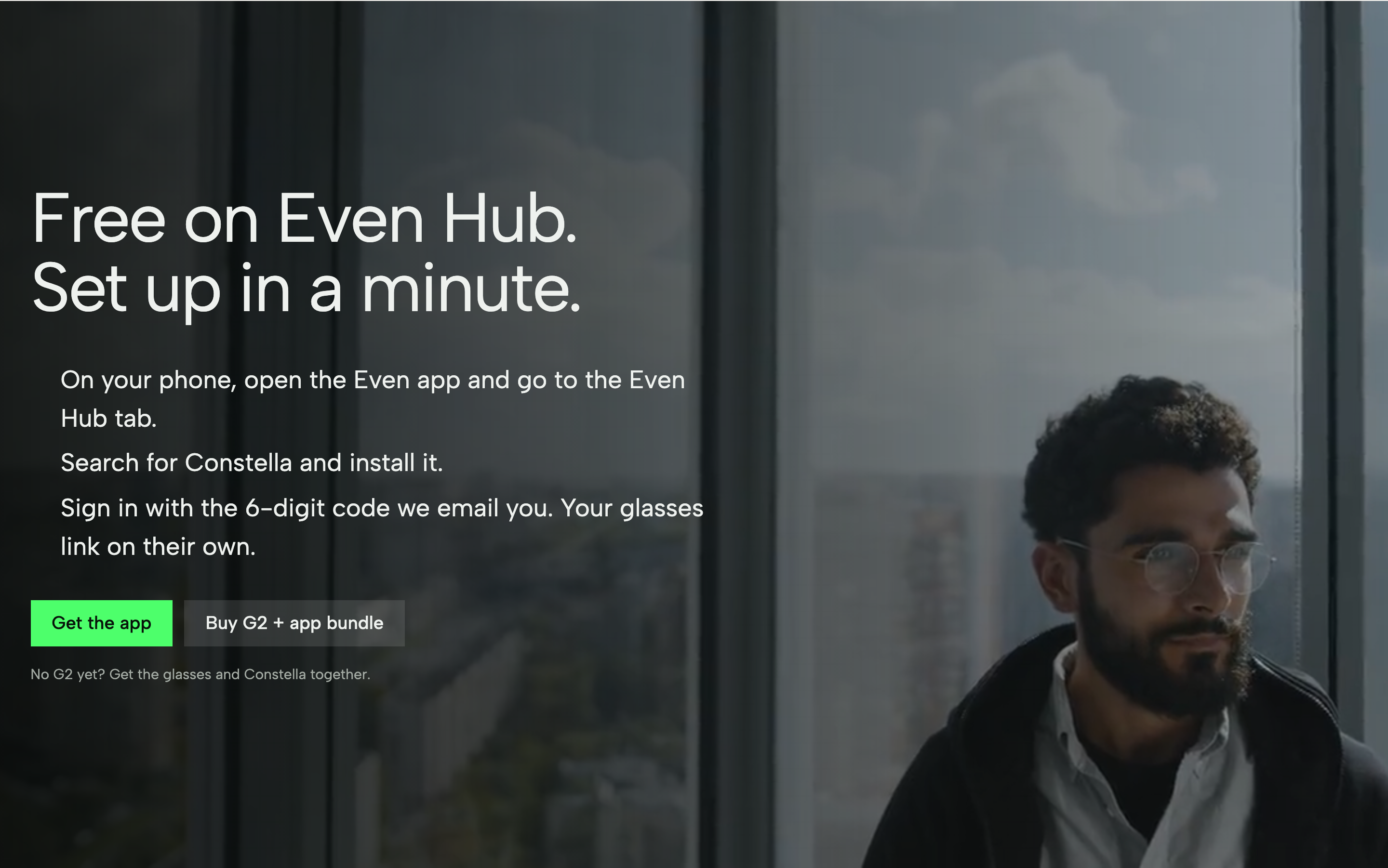 From our glasses page: the Even Hub install steps and the 6-digit sign-in code.
You can also browse every app on the web first, at the Even Hub catalogue, without your glasses nearby.
A simple first-week plan
Back to our scenario. It is your first week, and you have ten minutes. Here is a calm way to start:
- Day 1: install Weather and Books. They need nothing, so you learn the gestures with no risk.
- Day 2: add Navigaze before your commute. Try one walk with the phone in your bag.
- Day 3: pick one AI app for work. If your calls depend on past email and notes, try a memory app like Constella for Even G2 and connect your email first. If you want help with the talk in front of you, try IRIS.
- Day 7: look at what you actually opened. Keep three. Delete the rest.
The apps that stay are the ones that answer a question you were already asking your phone: where do I turn, do I need a coat, what page was I on, what did she say last time.
Frequently asked questions
Are Even Hub apps free?
Most are. Books, Weather and the free tier of Navigaze cost nothing. Paid apps usually charge a monthly plan inside the app, such as IRIS Pro at $14.99 a month or Navigaze Pro at $4.99 a month (as of November 2026). Some AI apps are free to install but need your own paid API keys.
How many apps are on Even Hub?
About 50 at launch in spring 2026, by Android Authority's count. Owners now guess several hundred, and the community GitHub list tracks more than 250 open apps. Even has not published an official total, so treat any number as a rough guess.
Can I browse Even Hub without glasses?
Yes. Since October 2026, the full store is on the web at hub.evenrealities.com/catalogue. You can read each app's page, maker and details there. To install, you still use the Even Hub tab in the Even app on your phone.
Can I run two Even G2 apps at once?
No, not today. Hub apps run one at a time as plugins inside the Even app. You can make switching faster by adding your favorites to the tap-and-hold shortcut menu, which holds 10 shortcuts.
Do Even G2 apps need my phone?
Yes. Hub apps run through the Even app on your phone and send what they show to the glasses. Keep the phone nearby, with Bluetooth on and the Even app running. Some apps also need the internet or a computer at home.
What is the best AI app for Even G2?
It depends on the job. For answers from your own email, notes and past meetings, Constella (our app) is built for that. For help in the conversation in front of you, IRIS. For running your own agent with full control, OcuClaw, if you are fine with the setup.