
Digital journaling has become a popular way to be productive, combining the thoughtful aspect of traditional journaling with the benefits of digital technology. Unlike regular productivity tools that focus on managing tasks in a strict manner, digital journals offer more flexibility.
With features like easy note organization, powerful search capabilities, and smooth integration across devices, digital journaling meets various needs. Users can record their thoughts, monitor their progress, and reflect on their daily activities all in one place.
Key takeaway: Many people are choosing digital journaling over traditional productivity tools because of its unique features and advantages.
The Evolution of Journaling as a Productivity Method

The practice of journaling has changed significantly over time. Initially, journals were used for emotional venting and personal reflection. Today, the rise of digital journaling has transformed how individuals manage their productivity and knowledge.
- Traditional Journaling: Involves using physical notebooks to jot down thoughts, ideas, and plans.
- Digital Journaling: Utilizes apps and software to record information, offering features such as cloud storage, tagging, and search functionality.
Digital journals provide an infinite canvas that aligns with how our brains process information — contextually and visually. Unlike document-based note-taking that confines you to an A4 size paper, digital journals allow for endless connections between ideas.
Benefits of Interconnected Notes and Structured Information
Digital journaling excels in creating interconnected notes which enhance knowledge management:
- Interconnected Notes: Digital journals link related notes effortlessly, fostering idea generation by showing how concepts interrelate.
- Structured Information: Allows for better organization through tags, folders, and search functions, making information retrieval quick and intuitive.
Innovative tools like Obsidian, Roam Research, and Logseq have embraced this interconnected approach but often require manual tagging. Newer applications like Constella automate this process, providing a seamless experience by automatically organizing notes and visualizing connections.
The evolution of journaling reflects a shift towards more dynamic and efficient methods of tracking thoughts and managing knowledge.
Key Features That Make Digital Journals Stand Out
Digital journaling apps are packed with features that enhance productivity, accessibility, and usability. These essential features make digital journals a preferred choice for many over traditional methods:
- Offline Mode: The ability to access and update your journal without an internet connection ensures that you can jot down thoughts and ideas anytime, anywhere.
- Calendar Integration: Syncing your journal with your calendar allows for streamlined planning. You can easily connect your daily notes with appointments, deadlines, and events.
- Powerful Search Functions: Advanced search capabilities enable quick retrieval of specific entries. You no longer need to flip through pages; a simple search query can bring up relevant notes instantly.
The importance of native applications across devices cannot be overstated. With digital journaling apps available on smartphones, tablets, and desktops, you have the flexibility to access and update your journal from any device. This seamless integration enhances accessibility and ensures that your information is always at your fingertips.
Key features in these apps not only boost productivity but also make the process of journaling more intuitive and efficient. The combination of offline mode, calendar integration, powerful search functions, and cross-device accessibility sets digital journals apart as a superior productivity tool.
Building Your Digital Brain with a Knowledge Graph
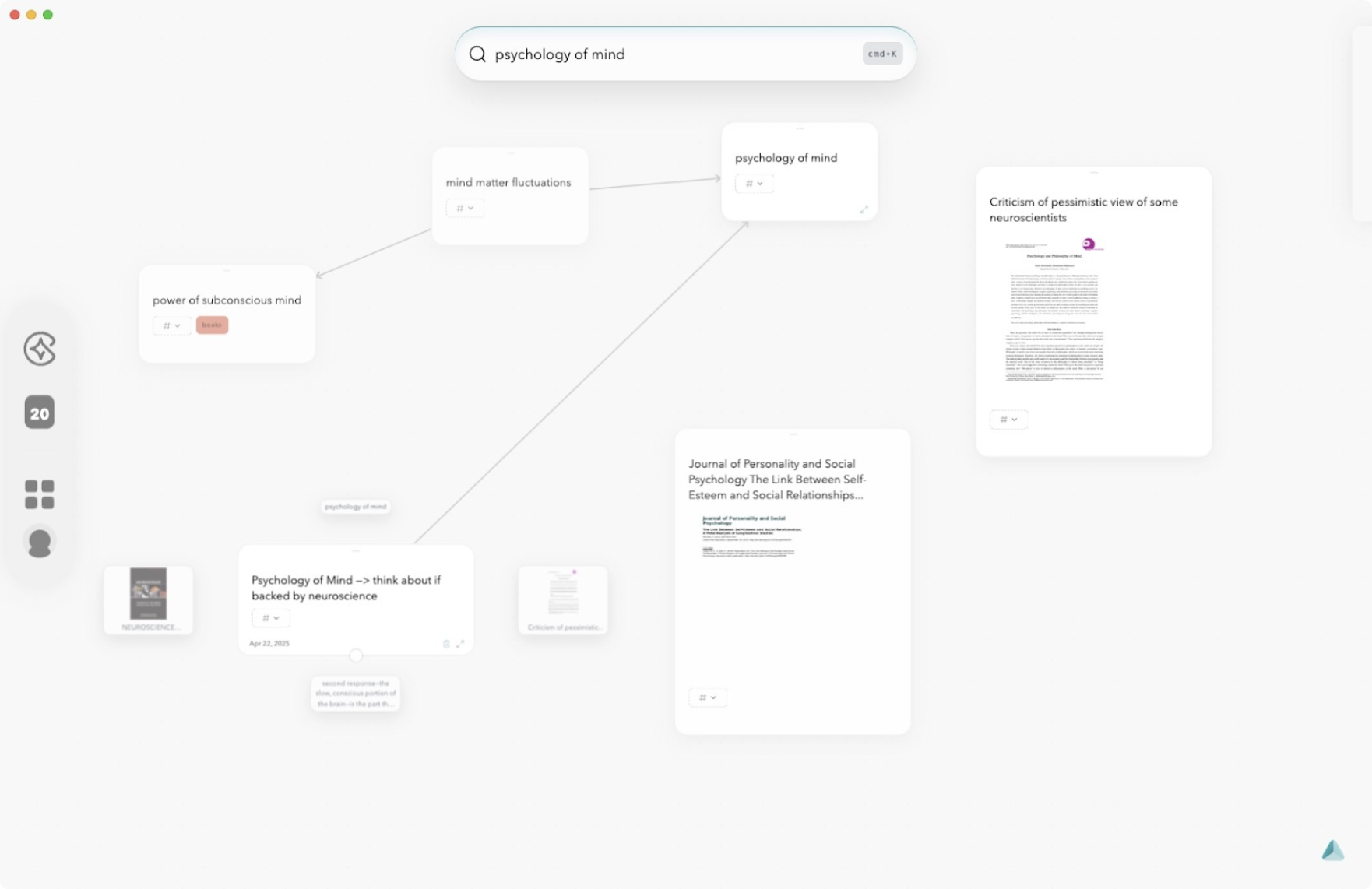
Digital journals offer a unique way to unify daily notes, appointments, and projects within an interconnected system known as a knowledge graph. This method brings all your information together, making planning and reflection more efficient.
Key Benefits of Using a Knowledge Graph in Digital Journals:
- Unified Information: By linking various notes, tasks, and appointments, a digital journal creates a cohesive view of your activities. Instead of scattered pieces of information, you get a comprehensive picture that helps you stay organized.
- Contextual Connections: A knowledge graph connects related notes and ideas contextually. When you add new information, the graph can automatically suggest relevant connections, ensuring that nothing gets lost or forgotten.
- Efficient Planning: With everything interconnected, it's easier to see how different tasks and projects relate to each other. This clarity aids in planning your daily schedule and long-term goals more effectively.
- Enhanced Reflection: Having all your data in one place allows for better reflection on past activities. You can track progress, identify patterns, and make informed decisions based on comprehensive insights from your digital journal.
By integrating these features into your daily diary routine, digital journals transform the way you manage information. They provide a structured yet flexible approach that traditional productivity tools often lack.
Digital Journaling Tools vs. Specialized Productivity Apps

Specialized productivity apps like Kanban boards, checklist managers, and reminder systems offer targeted solutions for project management, task tracking, and habit formation. Trello, Todoist, and Notion bring structured workflows, automation rules, and notification systems designed for specific productivity needs. These tools excel at providing rigid frameworks—move cards in a Kanban board, set recurring reminders, or track progress with clear visual cues.
Digital journaling tools such as Constella or Obsidian approach productivity from another angle. Instead of confining information to rigid templates or silos, digital journals provide an open canvas where notes, thoughts, tasks, and ideas interconnect freely. They allow seamless linking between meeting notes, research insights, and to-do items without constraints imposed by fixed categories. The combination of networked note-taking and smart retrieval replaces traditional folder structures with context-driven organization.
Users often discover that neither approach alone covers every need. A researcher might use a Kanban board for tracking project stages but rely on digital journaling for synthesizing insights across papers. Entrepreneurs may set reminders in their phone while also maintaining a daily digital journal for brainstorming and reflection.
Matching the right mix of specialized apps and flexible journaling tools creates a personalized system—one that serves both immediate action and long-term thinking. This blend empowers you to adapt as your workflow evolves.
Flexibility and Integration: The Advantages of Going Digital with Your Journal
Digital journaling tools redefine what it means to manage a journal diary or a journal app. Unlike the rigid structures of document-based systems, a digital journal diary app gives you the ability to capture fleeting ideas, track ongoing tasks, and pivot between projects—all within a single interface. This flexibility in managing tasks comes from features such as:
- Dynamic note linking: Connect related thoughts instantly, map out mindsets, or develop ideas without flipping between disconnected files.
- Context switching: Jump from daily reflections to project plans or meeting notes without losing your place or train of thought.
- Custom workflows: Adapt your journal diary app to suit personal rhythms—whether you prefer linear task lists, visual mind maps, or freeform entries.
Integration capabilities set digital journal apps apart. With cloud syncing and native cross-device apps, your notes are never locked into one device. Start writing on your phone during a commute, add images from your tablet later in the day, and review everything on your desktop at night. Many digital solutions also integrate with calendars, reminders, and third-party productivity tools for seamless information flow.
A truly modern digital journal ensures that every entry is accessible when and where you need it, blending flexibility with powerful integration for a frictionless journaling experience.
Constella.App: A Game Changer in the World of Digital Journaling
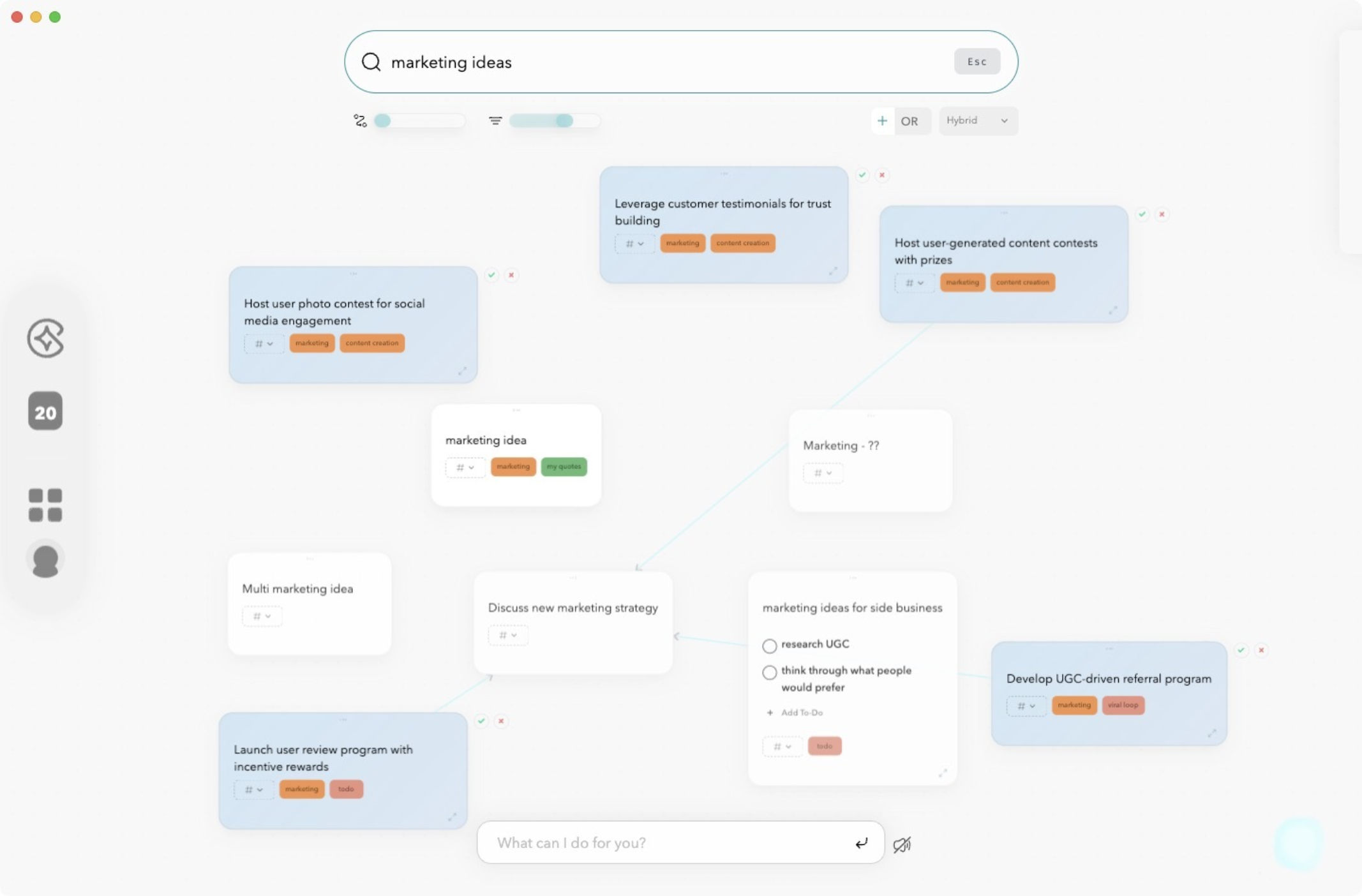
Constella isn't just a digital journal—it’s a thinking environment built for clarity, creativity, and cognitive alignment. Designed for people who think in webs, not lists, Constella helps you capture your thoughts, connect them meaningfully, and retrieve them exactly when you need them.
- **Visual Knowledge Graph – Map Ideas, Don’t File Them: **Constella displays your notes as a living graph, helping you visualize how ideas link together. Instead of isolating your thoughts in folders or pages, each note lives in context—automatically connected to related ideas. This spatial organization supports long-term memory and reveals new patterns in your thinking.
- **Smart Search and Magic Bar – Find Anything, Instantly: **The Magic Bar acts like an intelligent command center. Search for notes, link ideas, or generate summaries in seconds—without digging through menus. It learns how you think, surfacing the most relevant information based on context and behavior.
- **Real-Time Related Notes – Stay in the Flow: **As you type, Constella automatically surfaces related notes in real time. This means less context switching, fewer mental tabs, and deeper focus. You stay anchored in your train of thought while the system quietly feeds you relevant insights in the background.
- **Stella AI – A Thinking Partner, Not Just an Assistant: **Stella is Constella’s built-in AI that helps you reason through ideas, summarize long notes, generate outlines, and even answer questions using your own writing. It doesn’t just respond—it builds on your thinking, giving you a sense of cognitive collaboration.
- **Infinite Canvas – Freeform Structure for Organic Thought: **Constella’s infinite canvas lets you map out ideas without constraint. Sketch out big-picture thinking, build mental models, or brainstorm across space. No more rigid page formats—just fluid thinking, spatial freedom, and clarity.
Whether you're journaling daily, mapping projects, or connecting research across disciplines, Constella adapts to how your mind works—not the other way around. It’s not about capturing more, but capturing smarter.
Conclusion
Digital journaling is changing how people manage their productivity. Unlike traditional tools, it brings together different parts of life into one easy-to-use platform. This makes it a popular choice for many.
The reasons behind this shift are clear:
- Seamless Connectivity: Digital journals can connect with other apps and devices, making it easier to track tasks, appointments, and goals all in one place.
- Powerful Search Functions: Finding specific notes or entries becomes effortless with advanced search features, saving valuable time and effort.
- Visual Graph Capabilities: Many digital journaling apps offer visual representations of data through graphs and charts, providing insights into patterns and trends that may not be immediately apparent.
Trying out Constella.App offers a firsthand experience of these benefits. With features like Smart Retrieval for instant note recall and Stella Chat for logical reasoning and task completion, Constella stands out as a reliable tool for anyone looking to enhance their productivity through digital journaling.
Give Constella App a try and experience how it can transform your productivity approach with its innovative features.
FAQs (Frequently Asked Questions)
What is digital journaling and why is it gaining popularity as a productivity method?
Digital journaling refers to the practice of maintaining journals or diaries using digital tools and apps. It is gaining popularity because it offers unique features such as easy accessibility, powerful search functions, and integration across devices, making it a preferred choice over traditional productivity tools for many individuals.
How has journaling evolved from traditional methods to digital formats?
Journaling has transitioned from paper-based note-taking to digital platforms that enable interconnected notes and structured information management. This evolution enhances knowledge management by allowing users to organize thoughts, appointments, and projects more efficiently within digital journals.
What key features should I look for in a digital journaling app?
Essential features include offline mode for uninterrupted access, calendar integration to manage schedules, powerful search functions for quick retrieval of notes, and native applications across multiple devices to ensure enhanced accessibility and usability.
How does building a knowledge graph enhance the effectiveness of digital journaling?
A knowledge graph creates an interconnected system linking daily notes, appointments, and projects within your digital journal. This structure facilitates efficient planning and reflection by visualizing relationships between different pieces of information, effectively building your 'digital brain.'
Can digital journaling tools replace specialized productivity apps like Kanban boards or reminder systems?
While digital journaling tools offer flexibility and integration capabilities, specialized productivity apps provide targeted features such as Kanban boards and advanced reminder systems. Combining both based on user requirements often yields the best productivity outcomes.
What makes the Constella App a game changer in digital journaling?
Constella App stands out with its Smart Retrieval feature for instant note recall, Visual Graph that displays networked connections between notes, and connectivity with Stella Chat which aids in logical reasoning and task completion. These innovative features enhance productivity and make Constella a reliable tool for effective digital journaling.
Want more insights like this?
Subscribe to get short productivity tips and useful summaries of new tools every week.
Want more insights like this?
Subscribe to get short productivity tips and useful summaries of new tools every week.


