
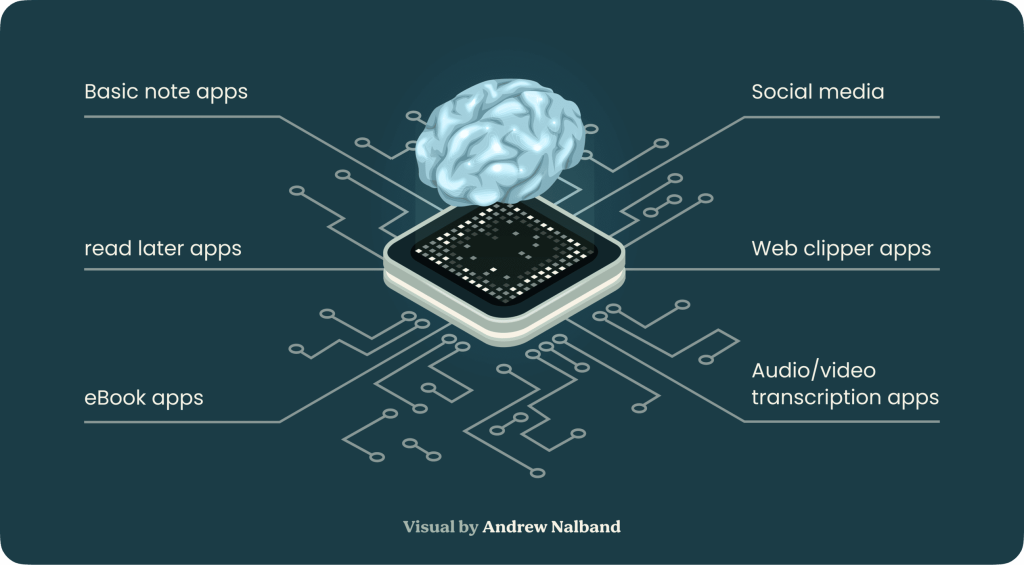
A second brain app is a tool that helps you manage your knowledge better. It's like having an extra memory where you can store and organize information, making it easier to find and use later. These apps are designed to work alongside your brain, helping you remember things more efficiently and making connections between ideas. By storing information externally, these apps help reduce cognitive load and improve recall accuracy. Second Brain apps categorize and link related concepts, facilitating better understanding and connections between ideas. With quick access to organized data, users can streamline workflows and execute tasks more efficiently. The ability to link disparate pieces of information can spark new ideas and foster creative thinking.
A Second Brain app is not only for productivity enthusiasts but for anyone looking to manage their knowledge effectively. It transforms the way you capture thoughts and retrieve information, making your personal and professional life more organized and insightful.
Debunking Myths About Second Brain Tools
Second Brain apps often face skepticism due to several misconceptions. Many believe these tools are only for productivity enthusiasts or tech-savvy individuals. In reality, Second Brain apps are designed to enhance anyone's ability to capture and organize thoughts effectively.

Myth: Second Brain apps are complex and require advanced technical skills.
Reality: Modern Second Brain tools offer user-friendly interfaces that cater to both beginners and experienced users. Features like AI-driven note organization and intuitive visual graphs simplify the process for everyone.
Myth: These tools are only useful for work-related productivity.
Reality: While Second Brain apps can boost productivity, they also enhance creativity, facilitate learning, and assist in personal projects. Whether you're a student, researcher, or hobbyist, these tools provide significant benefits.
Making the Concept of a Second Brain Relatable for Non-Tech-Savvy Individuals
For non-tech users, understanding how a Second Brain app works might seem daunting. Think of it as having an external memory aid that seamlessly captures your ideas and notes. Imagine a digital assistant that not only stores information but also connects related thoughts automatically.
By utilizing AI technology, these apps mimic human memory associations, making it easier to recall and build upon past knowledge. Tools like Constella go further by offering features such as automatic note tagging and visual graph-based connections, ensuring that your ideas are always accessible and interconnected.
Second Brain apps transform the way we manage information, making memory improvement achievable for everyone—not just productivity nerds.
How Second Brain Apps Work: A Closer Look at Networked Note-Taking Systems
Second Brain apps break away from the traditional approach of document-based note-taking. Instead of treating each note as a static “page,” these tools leverage a networked system that mirrors how your brain naturally forms connections. You aren’t limited to folders or linear organization—your thoughts, ideas, and memories become nodes in a living web of knowledge.

The Science Behind Networked Notes
Human memory thrives on context and association. When you remember one idea, your mind instantly jumps to related concepts through invisible mental links. Networked note-taking apps recreate this process digitally:
- Every note is a node: Each thought you capture stands alone but can connect to any other.
- Bidirectional linking: You can create links between notes, building pathways just like neurons forming synapses.
- Contextual recall: When you search for information, the app surfaces not just the note itself but all its related connections.
This structure turns scattered jottings into a robust web of knowledge that grows more powerful with each connection. You don’t simply collect data—you actively build understanding.
Leading Apps Using Networked Note-Taking
Several apps have championed this approach, each with unique strengths:
Obsidian
- Local-first storage for privacy, speed, and full ownership of your data
- Markdown-based notes with easy link creation using
[[double brackets]] - Graph view visualizes connections between notes, helping explore your knowledge base
Tana
- Combines outlining with networked references and flexible data modeling
- Dynamic tagging and live queries enable powerful organization and retrieval
- Supports both highly structured workflows and exploratory, freeform thinking
Mem
- Focuses on effortless capture—every quick note can be automatically linked and surfaced later
- AI-driven suggestions and smart resurfacing reveal useful connections and relevant content
- Designed for users who prefer minimal manual organization and a lightweight, always-evolving knowledge base
Apps like Obsidian, Tana, and Mem show how shifting from rigid folders to living networks enhances memory recall, creativity, and insight. This method turns every note into part of a larger whole, mirroring the associative power of your mind.
Choosing the Right Second Brain App for You

When selecting a Second Brain app, several key features can significantly impact your experience and effectiveness.
App reliability is crucial, as you need a tool that consistently performs well without glitches or data loss. Ensuring the app has robust offline access capabilities allows you to capture and retrieve notes even when you're not connected to the internet, making it indispensable for uninterrupted productivity.
The importance of a mobile-friendly design cannot be overstated. A Second Brain app should facilitate on-the-go note-taking, allowing you to jot down ideas quickly and easily from your smartphone. This ensures that your thoughts are captured seamlessly, no matter where you are.
Key Features to Consider:
- Reliability: Consistent performance and data security.
- Offline Access: Ability to use the app without an internet connection.
- Mobile-Friendly Design: Optimized for smartphone usage.
A few popular choices include Obsidian, which offers extensive customization and powerful linking features but requires manual tagging; Roam Research with its dynamic database structure; and Logseq, known for its simplicity and open-source nature. For those looking for a seamless experience with automated organization, Constella stands out with its AI-driven note management and intuitive interface.
Practical Applications of Second Brain Apps Beyond Productivity Tasks
1. Creativity support
Creativity support comes naturally with Second Brain apps. When your notes and ideas are visually connected, unexpected relationships spark new concepts. Mind mapping a project in tools like Constella or Obsidian lets you drag connections between ideas, surfacing insights that would remain hidden inside isolated documents. Artists and writers use these systems to build story universes or brainstorm themes by seeing their thoughts as a living network.
2. Learning enhancement
Learning enhancement is another core benefit. You can import research, highlight main points, and link related materials across subjects. A student might connect class notes, textbook excerpts, and online resources in a single graph—making revision intuitive and context-rich. Features like automated tagging and smart retrieval mean relevant information resurfaces exactly when you need it, reducing time wasted on searching or duplicating effort.
3. Problem-solving aid
Problem-solving aid emerges from the way these tools mirror human associative thinking, making complex decisions more manageable by mapping options, trade-offs, and outcomes visually. For example, you can outline a decision tree by connecting relevant research and past experiences, or use the Stella AI assistant in Constella to analyze links between notes for logical reasoning or creative suggestions. These systems also let you capture evolving thoughts during brainstorming sessions without losing context.
Second Brain apps adapt to different thinking styles—supporting everyone from researchers and designers to lifelong learners seeking clarity in chaos.
Integrating a Second Brain App Into Your Daily Routine: Tips and Tricks

Reducing cognitive load and enhancing information recall can transform your daily workflow. Here are practical strategies to seamlessly incorporate a Second Brain app into your everyday life:
1. Start Your Day with Note Review
- Begin each day by reviewing notes from the previous day.
- Identify key tasks or ideas that require attention.
2. Utilize Mobile-Friendly Features
- Leverage mobile apps for on-the-go note-taking.
- Capture ideas instantly, preventing thought loss.
3. Create a Routine for Note Organization
- Set aside specific times during the day for organizing and tagging notes.
- Use automatic features to reduce manual effort.
4. Employ Visual Graphs for Contextual Understanding
- Regularly interact with visual graphs to see connections between notes.
- Enhance memory associations by visually mapping concepts.
5.Use AI Assistants for Smart Retrieval
- Engage AI assistants like Stella to retrieve relevant notes while typing.
- Benefit from instant recall of interconnected ideas.
6. Incorporate Voice Notes for Efficiency
- Utilize voice-to-text features during meetings or brainstorming sessions.
- Transcribe voice notes automatically for easy future searches.
7. Quick Clipping from Other Apps
- Clip content from web pages and other apps using share features.
- Ensure all valuable information is captured in one place.
By integrating these strategies, you can significantly reduce cognitive load and improve information recall, making your Second Brain an indispensable part of your daily routine.
Constella: The Ultimate Second Brain App for Memory and Idea Capture Enhancement
Constella App stands out as a second brain designed for effortless memory and idea capture. Its graph-first, infinite canvas mimics the way your mind naturally links concepts, so you can visually map thoughts and see connections instantly.
Key features shaping Constella’s edge:
- Infinite Visual Graph View – An open, zoomable canvas where your notes live as draggable, linkable nodes instead of in folders.
- Real-Time AI Recall – As you type or jot ideas, AI surfaces related notes, highlights, and files automatically.
- Stella AI Assistant – Chat with Stella to search personal notes, summarize content, spin up new nodes, browse the web in real time, and document your session.
- Jotting Mode (Instant Capture) – A freeform daily pad lets you capture thoughts with a quick hit of Enter; later, ideas can be linked or dragged onto the graph.
- Mobile & Offline-First Support – Mobile apps (Android/iOS) offer quick capture and AI recall anywhere; data is stored locally with optional encrypted sync.
- Local-First + Data Privacy – Your knowledge is stored locally by default; optional sync uses encrypted buckets and you can export easily in Markdown.
- Smooth Importing & Exporting – Import from Evernote, Notion, OneNote, and export your graph or notes in Markdown anytime.
With Constella, building a true second brain becomes intuitive—never lose an idea, always find what matters.
FAQs (Frequently Asked Questions)
What is a Second Brain app and how does it help with personal knowledge management?
A Second Brain app serves as an external repository of your knowledge, allowing you to capture, organize, and retrieve information efficiently. It enhances personal knowledge management by improving memory associations and making information easily accessible whenever needed.
Are Second Brain tools only for tech-savvy users?
No, Second Brain tools are designed to be accessible for all users, including non-tech-savvy individuals. These apps simplify the process of organizing knowledge and can be tailored to suit various levels of technical expertise.
How do networked note-taking systems in Second Brain apps like Obsidian and Tana work?
Networked note-taking systems connect individual notes through links and associations, mimicking human memory patterns. Apps like Obsidian, Tana, and Mem utilize this system to enhance recall and understanding by creating a web of interconnected information.
What key features should I consider when choosing the best Second Brain app for my needs?
Important features include app reliability, offline access capabilities, and a mobile-first design for on-the-go note-taking. Selecting an app that aligns with your workflow ensures seamless integration into your daily routine.
Can Second Brain apps support creativity and problem-solving beyond productivity tasks?
Yes, beyond managing tasks, Second Brain apps facilitate creativity by organizing ideas effectively, enhance learning by structuring knowledge intuitively, and aid problem-solving through easy retrieval of relevant information.
How can I integrate a Second Brain app into my daily routine to reduce cognitive load?
Incorporate strategies such as regular note capturing, consistent organization of information, and frequent review sessions. This approach helps reduce cognitive load by offloading memory tasks to the app and improves overall information recall.
Want more insights like this?
Subscribe to get short productivity tips and useful summaries of new tools every week.
Want more insights like this?
Subscribe to get short productivity tips and useful summaries of new tools every week.


