
The Problem with Most Diary Apps (and What to Look for Instead)
Memories shape who we are, and journaling is one of the most personal ways to preserve them. Whether you're recording daily thoughts, documenting a trip, or reflecting on emotional moments, a good journaling habit can bring clarity, calm, and connection to your life. But choosing the right digital diary can be tricky. While many apps promise to make journaling easier, they often fall short, leaving users to struggle with awkward features and limited flexibility. This article will guide you through what to look for in a modern diary app, explore top options available today, and introduce new AI-powered tools that are changing the way we write and remember. But first, let’s dive into the main topic: the problem with most diary apps.
The Problem with Most Diary Apps Diary apps often promise a simple way to capture your life, but many lack the flexibility and features people really want. First, their design feels too rigid. You open the app, see fixed boxes or bland templates, and find yourself forcing all your thoughts into little boxes. There’s no room to wander, jot random ideas, or add personal touches. Second, search functions are nearly non-existent. Want to find that note you wrote last month about a weekend trip? You’ll need to scroll and scroll without any real hints, turning a quick check into a lengthy search. Viewing memories also feels limited. Instead of seeing entries on a map, a calendar, or in a gallery full of photos, you get only text and dates. Finally, sharing is awkward. You might write something worth posting on your social accounts like Instagram, but the app won’t create a shareable image or caption. You end up copying, pasting, and resizing screenshots. In short, traditional diary apps look neat but box you in, hide your memories from view, and make sharing a chore.
Old-School Diary Apps vs. Modern Digital Journaling Tools As we mentioned above, old-school diary apps feel like digital notebooks that only let you type a date and drop in text. They often hide entries behind calendar grids, with no real way to add photos, tag moods, or see patterns over time.
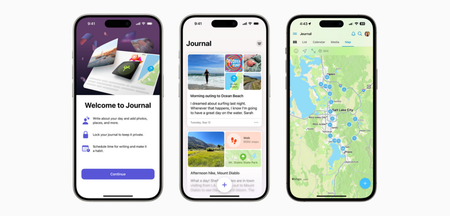
Modern journaling tools, on the other hand, work more like a living memory vault. You can add everything you want so that when you look back, you’ll see not just what you wrote, but also where you were and what was happening. Search bars let you jump straight to keywords—no endless scrolling. Many allow you to view entries on a map, in a gallery, or as a timeline, making it easier to spot trends. They also offer prompts, mood trackers, and social-media share options, so you don’t just write; you relive and share moments.
What to Look for in a Modern, All-in-One Diary App Here are the key features to look for in a modern diary solution: Flexible Entry Options: Look for an app that allows you to add text, photos, voice notes, or sketches in any order. Mixing different media in one entry makes it easy to capture ideas exactly how they happen. Full-Text Search: Choose a diary app that lets you type a word or phrase to find older entries. This saves you from scrolling through months of dates and makes it simple to revisit specific memories. Media Attachments and Gallery View: The app should be able to store photos and videos alongside your text. A gallery layout helps you relive moments at a glance rather than hunting through separate folders. Location Tags and Map View: Ensure the app allows you to pin where you wrote each entry. Seeing entries on a map helps you remember the places connected to your stories. Calendar and Timeline Views: Calendar and timeline views help you identify habits, trends, or gaps in your journaling over time. Mood Tracking and Tags: Choose an app that enables you to mark your mood or add tags to each entry. Tracking emotions and topics helps you recognize patterns in how you feel and what you write about. Social Media Integration: A diary app should allow you to export entries as ready-to-post images or stories for Instagram, Facebook, or Twitter. This feature saves you time and keeps your memories shareable. AI-Powered Summaries and Prompts: Look for an app that suggests topics based on past entries or generates short summaries of lengthy journal pages. AI-driven tools can ignite ideas when you feel stuck. Reminders and Writing Prompts: Some diary apps send writing reminders and offer built-in questions that can help you remain consistent and delve deeper with each entry. Privacy and Encryption: Strong encryption with a password or biometric scan can keep your thoughts safe and private. Offline Access and Cloud Sync: Choose an app that works without internet access and automatically syncs when you’re back online. This ensures you can write anywhere without losing data. With these features, you’ll never feel limited. Instead, you’ll enjoy an app that grows with your needs.
Most Popular Diary Apps and Journaling Solutions When it comes to choosing a diary app, most people just search “best diary app” and download whatever shows up first. To save you the trial-and-error, here are some of the most popular and widely used diary apps available for different platforms. Day One (Android, iOS, macOS, Windows, Web) Day One has been a top choice for years because it combines a clean interface with powerful tools. You can add text, photos, audio, and location data. Its calendar and timeline views help you find entries fast.
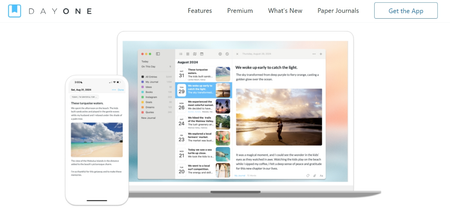
Pros: excellent search, automatic weather and location tags, and strong encryption keep your diary private. Cons: some features (like multiple photos per entry) require a subscription, and the interface can feel busy for beginners.
Journey (Android, iOS, macOS, Windows, Linux, Web) Journey offers a straightforward layout that still feels modern. You can attach photos, videos, and audio clips, and then view entries on a map or calendar.
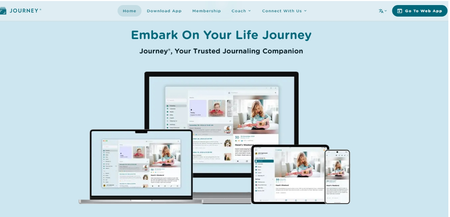
Pros: The free version has plenty of features (tags, reminders, and basic search), and Google Drive sync keeps your data backed up.
Cons: The free search only covers recent entries, so finding older notes can be tricky without upgrading.
Diarium (Android, iOS, macOS, Windows)
Diarium stands out for its custom prompts and automatic social feed import (you can pull in tweets or Instagram posts). It stores voice recordings, photos, and locations, then displays them in a gallery or map view.
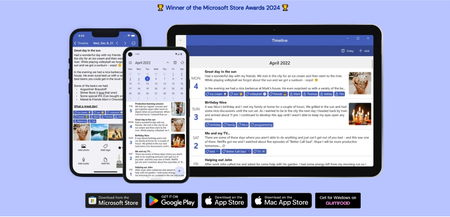 Pros: one-time purchase on Windows, Android, and iOS offers lifetime access—no subscriptions.
Cons: The interface feels slightly dated, and the search bar sometimes misses deeper keywords.
Penzu (Android, iOS, Web)
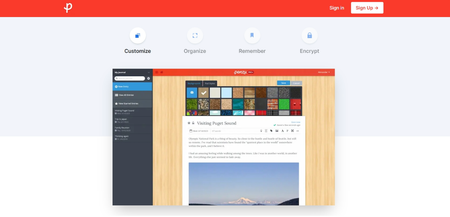
Penzu looks like an old-school notebook, complete with customizable covers. You can lock entries with a password and add photos or sketches.
Pros: one-time purchase on Windows, Android, and iOS offers lifetime access—no subscriptions.
Cons: The interface feels slightly dated, and the search bar sometimes misses deeper keywords.
Penzu (Android, iOS, Web)
Penzu looks like an old-school notebook, complete with customizable covers. You can lock entries with a password and add photos or sketches.
 Pros: simple free tier that’s easy to start, strong security features, and email reminders to keep you writing.
Cons: advanced features (like tagging and full-text search) cost extra, and its gallery view is limited compared to newer apps.
Daylio (Android, iOS)
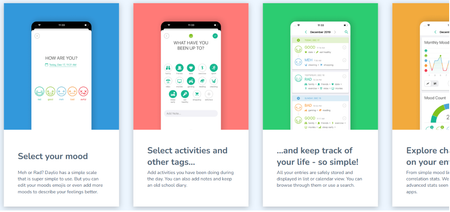
Daylio is more mood tracker than full journal, but its simple icons and prompts make daily logging effortless. You pick moods, add a few notes or emojis, and Daylio shows trends in a calendar or chart form.
Pros: simple free tier that’s easy to start, strong security features, and email reminders to keep you writing.
Cons: advanced features (like tagging and full-text search) cost extra, and its gallery view is limited compared to newer apps.
Daylio (Android, iOS)
Daylio is more mood tracker than full journal, but its simple icons and prompts make daily logging effortless. You pick moods, add a few notes or emojis, and Daylio shows trends in a calendar or chart form.
 Pros: quick mood tracking, built-in habit tracking, and free core features.
Cons: no free photo or location support, so it won’t replace a full diary app if you want rich media or long-form writing.
Each of these apps has built a loyal following by combining ease of use with thoughtful features. But that’s not where the story ends. Next, we’ll take a look at some alternative apps and approaches that go beyond the traditional diary format.
Alternatives to Traditional Diary Apps
Traditional diary apps are just part of the story. If you want more flexibility, creative layouts, or smarter tools to stay consistent, here are some modern alternatives worth exploring.
Use Constella for a Modern, All-in-One Diary Experience
Constella is an innovative online diary solution that combines many modern features discussed in this article. It offers flexible entry options, allowing you to add free-form text and attach photos without juggling rigid templates. Its powerful full-text search and simple tagging with hashtags or keywords let you find any memory in seconds.
Constella’s AI assistant (Stella) learns from your writing, suggesting related topics to explore and turning longer entries into concise recaps you can review or share. On the security side, it uses end-to-end encryption and offers offline access with automatic sync when you’re back online, so your journal stays private and up to date. You can format notes in Markdown, create bullet lists or free-form pages, and more.
These features address the biggest frustrations people have with traditional diary apps while providing a modern and flexible journaling experience.
Pros: quick mood tracking, built-in habit tracking, and free core features.
Cons: no free photo or location support, so it won’t replace a full diary app if you want rich media or long-form writing.
Each of these apps has built a loyal following by combining ease of use with thoughtful features. But that’s not where the story ends. Next, we’ll take a look at some alternative apps and approaches that go beyond the traditional diary format.
Alternatives to Traditional Diary Apps
Traditional diary apps are just part of the story. If you want more flexibility, creative layouts, or smarter tools to stay consistent, here are some modern alternatives worth exploring.
Use Constella for a Modern, All-in-One Diary Experience
Constella is an innovative online diary solution that combines many modern features discussed in this article. It offers flexible entry options, allowing you to add free-form text and attach photos without juggling rigid templates. Its powerful full-text search and simple tagging with hashtags or keywords let you find any memory in seconds.
Constella’s AI assistant (Stella) learns from your writing, suggesting related topics to explore and turning longer entries into concise recaps you can review or share. On the security side, it uses end-to-end encryption and offers offline access with automatic sync when you’re back online, so your journal stays private and up to date. You can format notes in Markdown, create bullet lists or free-form pages, and more.
These features address the biggest frustrations people have with traditional diary apps while providing a modern and flexible journaling experience.
Use Note Apps Like Notion or Evernote If you like organizing memories in your own way, use Notion or Evernote. With these note apps, you build a private journal that fits your style. Add headings like “Vacation Recap” or “Dreams and Ideas,” then drag in photos, voice clips, or links. This approach works best for people who love structure—think of it as creating your custom scrapbook. You decide how to group entries, tag topics, or even turn memories into checklists. It takes a bit of setup at first, but once you have templates ready, writing feels effortless. Create a Private Social Timeline with Momento The other approach is to use the Momento app alongside your social feeds. Momento automatically pulls in tweets, Instagram posts, and workout check-ins, then lines them up beside your own notes. This approach is perfect if you’re active on social media and want a private timeline of everything without switching apps. Just connect your accounts, write a short note when you like, and let Momento fill in the rest.
Try Reflectly for Guided Journaling If you are looking for a guided and reflective experience, choose the Reflectly app. It uses AI prompts to ask simple questions like “What made you laugh today?” or “What challenge did you face?” You can type a memory, add a photo, or just tap mood tags. Over time, its mood graphs show patterns, so you spot changes in your mental health or habits. This approach is great if blank pages feel overwhelming to you.
Explore AI-Powered Diary Solutions Finally, explore the growing world of AI-powered diary apps that go beyond simple note-taking. These smart tools don’t just store memories—they help you process, reflect, and stay consistent. For instance, AI Diary enhances your writing experience by analyzing mood, suggesting improvements, and turning your daily entries into meaningful reflections. Mindsera uses advanced AI to generate thoughtful prompts and mental health insights based on your journal content, making it ideal for deeper self-discovery. Apps like Reflection offer personalized journaling guidance and real-time summaries, helping you understand emotional trends and personal growth over time. Google’s Super Diary, built on Gemini API, allows you to instantly convert a chat-style interaction into a structured diary entry—perfect for people who journal best through conversation. Even mainstream apps like the updated version of the Journey app have embraced AI features. It can now auto-summarize entries, suggest new topics based on your past writing, and turn long thoughts into bite-sized insights you can easily review or share. Whether you prefer typing, speaking, or letting AI spark your thoughts, these modern solutions make journaling feel less like a task and more like something that goes beyond old-school text-only diaries.
Conclusion In the end, a good diary app should feel flexible, not confining. While many apps seem useful at first, they often end up feeling too limited. They may restrict how you write, make it hard to search old entries, or fail to present your memories in fun or meaningful ways. Sharing entries can also be frustrating, and deeper reflection often gets lost. Modern diary apps are changing that. They let you add photos, voice notes, and locations. Some even use AI to summarize your thoughts or share entries directly on social media. Plus, there are plenty of other helpful features. The best diary app is the one that fits your style and makes it easy to capture and revisit your memories. If journaling feels like a chore, the problem might not be you—it might be your app. Good luck choosing the one that works for you.
Want more insights like this?
Subscribe to get short productivity tips and useful summaries of new tools every week.
Want more insights like this?
Subscribe to get short productivity tips and useful summaries of new tools every week.


