
Personal Knowledge Management (PKM) helps busy professionals streamline the massive flow of information they handle daily. By systematically collecting, organizing, and using knowledge, PKM supports smarter decision-making and boosts productivity. A well-structured PKM system acts as a second brain, reducing information overload and enabling professionals to work more efficiently and effectively.
For those looking to master this art, the ultimate guide for 2024 offers valuable insights on boosting productivity, enhancing learning, and discovering the best tools for effective knowledge management. One such tool that has gained popularity in recent years is the document-based note-taking method. This technique not only streamlines the process of information retrieval but also plays a significant role in effective knowledge management.
Personal Knowledge Management (PKM)
Personal Knowledge Management (PKM) is a systematic approach to managing information, knowledge, and resources. It transforms scattered data into actionable insights, enabling goal-oriented actions. This process involves collecting, categorizing, storing, retrieving, and sharing information efficiently. Professionals can leverage PKM to create a structured system that supports continuous learning and decision-making.

How PKM Improves Workflow Efficiency
Integrating PKM into daily workflows allows busy professionals to enhance their productivity by ensuring that crucial information is always within reach. By implementing effective knowledge management systems, individuals can streamline their tasks and optimize their time usage.
Here are some ways PKM helps improve workflow efficiency:
- Centralized Information Access: PKM creates a single source of truth for all critical data.
- Enhanced Collaboration: Sharing organized knowledge fosters teamwork and innovation.
- Decision Support: Quick access to relevant data aids in making informed decisions.
Through these mechanisms, PKM becomes an indispensable tool for managing information overload and improving workflow efficiency, making it vital for anyone seeking to thrive in today’s fast-paced professional environment.
The Benefits of Effective PKM
✅ Enhancing Productivity
Personal Knowledge Management (PKM) strategies offer a significant advantage by improving productivity through efficient knowledge organization. By systematically categorizing and storing information, professionals can quickly access the data they need, reducing time spent on searching and allowing for more focus on key tasks. This kind of structured approach not only minimizes time wastage but also streamlines workflow processes.
✅ Managing Information Overload

In today's fast-paced digital world, professionals are constantly bombarded with vast amounts of information. PKM provides tools and techniques to filter, prioritize, and manage this deluge effectively. This ensures that only valuable and relevant information occupies your workspace, reducing stress and preventing burnout caused by an overwhelming influx of data.
✅ Unlocking Creative Potential
Structured knowledge management practices facilitate unlocking creative potential. With a well-organized system in place, the mental clutter diminishes, making room for innovative thoughts and ideas. When information is easily retrievable and organized logically, it becomes a fertile ground for creativity to flourish. This enhanced creative ability can lead to novel solutions and innovative approaches in professional settings.
Incorporating these productivity techniques into your daily routine not only enhances efficiency but also empowers you to harness your full creative potential while maintaining control over the constant flow of information.
Building a Second Brain with the PARA Organizational System
🧠 Understanding the Second Brain Concept
Tiago Forte introduced the Second Brain concept to empower individuals in managing complex information landscapes. This method serves as an external repository for thoughts, ideas, and knowledge, allowing professionals to free up cognitive space for creative and strategic thinking. By creating a second brain system, you can efficiently store and retrieve information as needed, enhancing decision-making and productivity.

🧠 Core Components of Building a Second Brain
Forte’s methodology emphasizes capturing and organizing information systematically. The Building a Second Brain (BASB) framework includes:
- Capture: Collect information from various sources.
- Organize: Structure this data for easy access.
- Distill: Simplify the information to its essence.
- Express: Use the refined knowledge to create actionable insights.
Note-Taking Strategies for Busy Professionals
Effective note-taking is a cornerstone of knowledge retention. For busy professionals, organizing thoughts and ideas quickly can make the difference between productivity and chaos. With the right strategies, notes become more than just scribbles—they evolve into actionable insights.
Different Note-Taking Systems
Various systems cater to different preferences and needs:
- Zettelkasten System: This method involves creating interlinked notes that mimic a hyperlinked database. It’s ideal for those who prefer a network of ideas rather than linear note-taking. You can explore how to use Zettelkasten in today’s world for modern tools that can help implement this system effortlessly.
- Analog vs. Digital Notes: While some prefer the tactile nature of analog note-taking with pen and paper, digital systems offer flexibility and ease of access. Apps like Evernote or Notion provide tools to capture, organize, and search through notes efficiently. However, if you're looking for the best AI note-taking app, there are several options available that can enhance your note-taking experience.
- Customization Tips: Tailor your system to fit your workflow. For example, combine digital tools with analog methods by digitizing handwritten notes using scanning apps.
Overcoming Complexity in PKM Systems: Strategies for Success!
Complexity in PKM systems can often lead to data debt, where the accumulation of unmanaged information becomes overwhelming. Professionals face several challenges with complex PKM systems:
Strategies to Avoid Common Mistakes
- Simplify Your System: Start simple by focusing on essential components. Gradually incorporate more complex features as needed.
- Set Clear Goals: Define what you want your PKM system to achieve. Whether it's project management or idea tracking, having a goal will guide system structure.
- Regular Reviews: Schedule periodic reviews of your notes and organizational methods. This helps in identifying redundant information and refining processes.
These hurdles require intentionality and flexibility to overcome. It is advisable to choose strategies that align with personal workflows while remaining open to adjustments as needs evolve. For instance, adopting the best PKM setup with AI can streamline personal knowledge management, organize information effortlessly, and retrieve insights efficiently. Additionally, utilizing tools like Constella can help you gain control over your life by tracking what's going on, enhancing personal control and productivity with innovative features.
Efficient Archiving Methods and Information Retrieval Techniques in Your PKM System
Keeping your Personal Knowledge Management (PKM) system neat and accessible is the secret sauce to staying productive. A well-organized archive not only ensures you can find what you need, but it also spares you from those “Where did I save that?” moments. And yes, Constella.App makes this a whole lot easier—more on that as we go along.

Archiving Tips to Stay Organized
- **Categorize Your Notes: **Start by setting up a consistent labeling system. Group your notes by project, topic, or date—whatever clicks for you. This structure means you’ll spend less time digging and more time doing. Constella.App’s tagging feature can help here, giving you flexible ways to sort and manage your knowledge.
- **Regularly Review and Refresh: **Don’t let your archive turn into a digital junk drawer. Set a reminder to review your notes every now and then, clearing out what’s outdated and refreshing what’s still relevant. Tools like Constella.App make this painless by letting you visualize and reorganize your data in just a few clicks.
- **Maximize Digital Tools: **Digital tools are your best friends for archiving. Features like tagging, metadata, and advanced search functions are lifesavers when it comes to managing a growing knowledge base. Constella.App shines in this area with instant recall and visual graphing that keeps everything connected and easy to find.
Smarter Ways to Retrieve Information
- **Use Searchable Keywords: **Adding keywords to your notes is like giving your ideas GPS coordinates—they’re easy to locate when you need them. Constella.App’s search functionality takes this up a notch, letting you retrieve files, notes, or even snippets of data in seconds.
- **Build an Index System: **Think of an index as a table of contents for your archive. Whether it’s a physical system or digital, it gives you a bird’s-eye view of what’s where. Constella.App’s visual graph can act as a living index, showing the relationships between your ideas and guiding you to what you need.
By pairing these techniques with tools like Constella.App, you’ll create a PKM system that doesn’t just store information—it works seamlessly with you, keeping everything actionable, accessible, and stress-free.
Streamlining Your Workflow with Constella.App: The Next-Generation PKM Tool
Constella.App redefines Personal Knowledge Management (PKM) with a suite of features designed to simplify and enhance how busy professionals manage information. More than just a tool, it’s a smart companion that adapts to your workflow, helping you turn chaos into clarity while staying productive.
Why Constella.App Stands Out
Visual Graphing for Clearer Connections
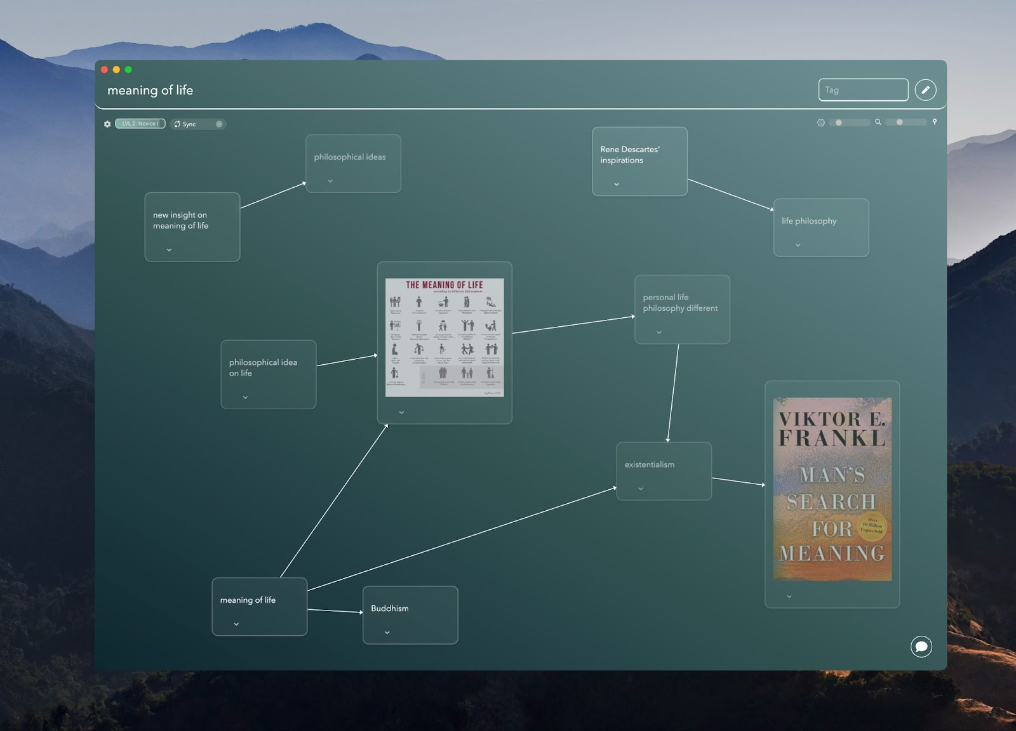
Constella.App’s Visual Graphing feature is a game-changer. It transforms your ideas and notes into an infinite graph, offering a dynamic, interconnected view of your knowledge. This intuitive setup makes it easier to see relationships between concepts, perfect for brainstorming, strategizing, or tackling complex projects.
Jotting View for On-the-Fly Ideas
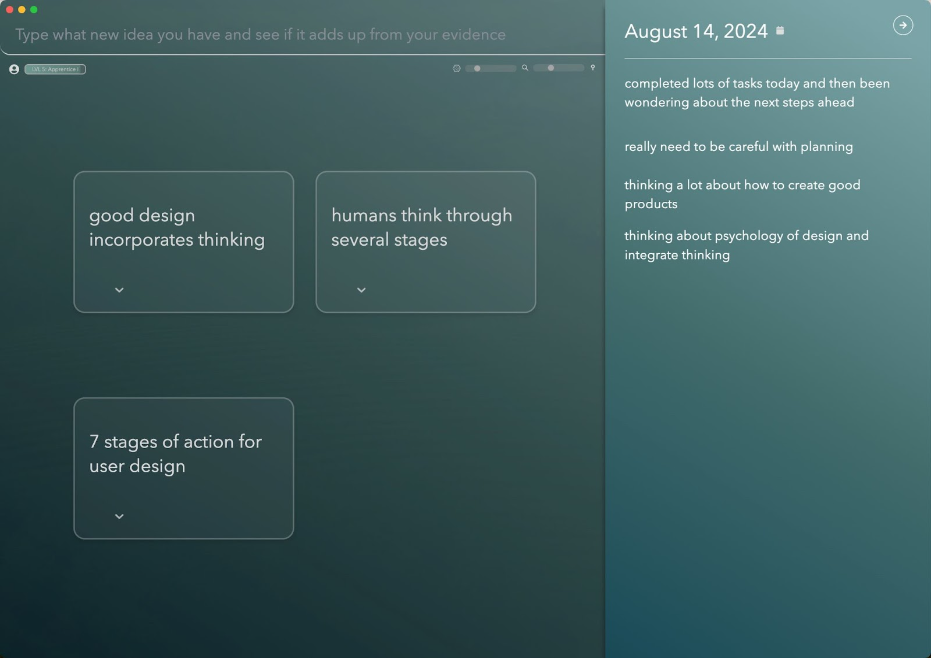
Need to capture a thought quickly? The Jotting View ensures no idea slips away. Whether you’re in the middle of a meeting or rushing between tasks, you can jot down notes effortlessly while maintaining context. It’s like having a mental inbox that keeps up with your pace.
Instant Recall for Fast Access
Forget endless scrolling or hunting through folders. Constella.App’s Instant Recall feature uses advanced search capabilities to help you find exactly what you need in seconds. Whether it’s a note, an image, or a key piece of data, everything is at your fingertips, saving you precious time.
Seamless File and Image Integration
Constella.App goes beyond text by letting you organize and search images and files within your knowledge base. This means your visual resources are just as easy to manage as your written ones, keeping all your assets in one streamlined system.
Distraction-Free Productivity
Unlike tools that overwhelm you with unnecessary features, Constella.App focuses on what matters. It provides everything you need for effective PKM—without the noise—so you can stay focused on achieving your goals.
By blending simplicity with cutting-edge functionality, Constella.App empowers professionals to take control of their knowledge, streamline their workflow, and stay ahead in an increasingly fast-paced world.
Constella.App benefits busy professionals by offering innovative solutions for Personal Knowledge Management (PKM). As a next-generation tool, it redefines how you engage with information, making it invaluable for those juggling multiple responsibilities.
Additional Features and Resources
Moreover, Constella also offers other features such as normal text search, export/import notes, Stella Chat, and more that further enhance its usability. For those interested in exploring more about writing and essays, the Constella Blog provides valuable insights and resources that can complement the knowledge management process.
Conclusion
Embrace Personal Knowledge Management for Busy Professionals. Adopting efficient PKM strategies can significantly boost productivity and streamline information management. Tools like Constella.App offer powerful solutions tailored for busy professionals.
- Constella's Unique Features: As a next-generation PKM tool, Constella stands out with its infinite graph capability, allowing thoughts to be captured quickly and retrieved effortlessly.
- Visual Graph Interface: Explore ideas dynamically through a visually appealing interface that enhances understanding and creativity.
- Jotting Feature: Capture ideas on the go, ensuring no moment of inspiration is lost, making it an indispensable tool for managing hectic schedules.
Integrating these tools into daily routines can revolutionize how professionals manage their knowledge, leading to enhanced efficiency and clarity in their work processes. For instance, by leveraging personal productivity systems that utilize tools like Notion, Obsidian, and AI, one can double their output while maintaining a healthy work-life balance.
FAQs (Frequently Asked Questions)
What is Personal Knowledge Management (PKM) and why is it important for busy professionals?
Personal Knowledge Management (PKM) is a process that helps individuals organize, manage, and utilize their knowledge effectively. For busy professionals, PKM is crucial as it enhances productivity and helps manage information overload by creating a structured system for retaining and retrieving information.
How does the PARA organizational system contribute to building a Second Brain?
The PARA organizational system, devised by Tiago Forte, consists of four key components: Projects, Areas, Resources, and Archives. This framework aids in organizing digital notes and resources efficiently, allowing users to create a 'Second Brain' that enhances their ability to manage information and retrieve it when needed.
What are some effective note-taking strategies for busy professionals?
Effective note-taking strategies include using systems like the Zettelkasten method or choosing between analog and digital notes based on personal preference. It's essential to customize these methods to fit individual workflows while ensuring that notes facilitate knowledge retention and easy retrieval.
What challenges do professionals face with complex PKM systems?
Professionals often encounter challenges such as procrastination and perfectionism when dealing with complex PKM systems. These obstacles can hinder effective knowledge management practices, making it essential to develop strategies that simplify workflows and encourage consistent engagement with the PKM process.
What are the best practices for archiving notes within a PKM system?
Best practices for archiving notes effectively include categorizing them based on relevance and ease of access, regularly reviewing archived materials, and employing tagging systems to facilitate quick retrieval. This ensures that important information remains organized and accessible for future projects.
How does Constella.App enhance the PKM experience for busy professionals?
Constella.App is a next-generation tool designed to improve Personal Knowledge Management by offering features like visual graphing for idea tracking and a jotting view for capturing thoughts on the go. Its unique interface allows users to explore ideas visually while ensuring quick retrieval of information, making it an invaluable resource for busy professionals.
Want more insights like this?
Subscribe to get short productivity tips and useful summaries of new tools every week.
Want more insights like this?
Subscribe to get short productivity tips and useful summaries of new tools every week.


