

Effective note-taking is crucial for productivity and managing ideas, as it enables you to capture thoughts quickly, organize information systematically, and retrieve it when needed. However, both traditional and digital note-taking systems present their own challenges: traditional systems are limited by document-based editing, which confines you to the constraints of an A4-size paper, while digital note apps often require manual tagging and can result in siloed thoughts. Regularly auditing your current note-taking system is essential to recognize when it’s time to upgrade; identifying inefficiencies can help you adopt a more suitable solution, ultimately enhancing idea retention and work efficiency.
Why Your Note-Taking System Might Be Holding You Back
Many traditional note-taking systems rely on document-based editing, which introduces several limitations that can hinder productivity. For instance:
- **A4-size constraints: **These systems often mimic physical paper, restricting your notes to a linear structure. This format does not align with how our brains process information. Human cognition operates on an infinite canvas, connecting ideas based on context and associations between neurons.
- **Lack of connections: **Document-based approaches typically lack the capacity to link related thoughts seamlessly. Without these connections, your ability to generate new ideas and develop insights is significantly reduced. Effective note-taking should mirror the brain's natural tendency to create networks of associated concepts.
- **Siloed thoughts: **Managing isolated notes can be challenging and often leads to forgotten information. When notes are scattered across various documents or apps without coherent organization, valuable insights are easily lost.
Modern note apps for Android aim to address these issues by offering features that better support how our brains naturally work. By incorporating tools that allow for infinite canvases and contextual connections, you can enhance your idea management and overall productivity.
Signs It’s Time to Upgrade Your Note-Taking System
Frequent frustrations with your current note-taking system can signal the need for an upgrade. During fast-paced meetings or lectures, you might find it challenging to capture all relevant information quickly. This struggle indicates that your current system may not be the best way to take notes for work.

Key indicators that it's time to consider a new note app for Android or other platforms include:
- Inability to Capture Ideas Efficiently: If you're constantly scrambling to jot down thoughts and missing key points, your current method might be too slow or cumbersome.
- Loss of Important Information: Poor categorization often leads to forgotten notes. When important details slip through the cracks, it hinders productivity and idea retention.
- Difficulty in Keeping Up with Fast-Paced Environments: In dynamic settings like business meetings or academic lectures, a lagging note-taking system can leave you behind, unable to keep pace with the flow of information.
Evaluating your experience during these moments can help identify whether your note-taking approach is holding you back. If these issues resonate with you, it may be time to explore more efficient solutions that streamline capturing and organizing your ideas effectively.
Common Inefficiencies in Traditional and Digital Note Apps

Even the most advanced note app can slow down your workflow or block your creativity if it’s not designed with the realities of human thought in mind. The classic document-based approach—still dominant in popular tools—often fails to keep pace with how ideas actually form and connect. When you rely on an app to keep track of ideas that constantly evolve, this becomes even more apparent.
Structure That Limits, Not Liberates
Many digital note apps, including well-known note app Android options, are built around a linear, document-centric format. This forces your thinking into a rigid structure, making it difficult to branch out ideas or visually map complex thought processes. In reality, creative thinking is rarely linear—it loops, shifts, and grows unpredictably. Without flexible ways to capture this flow, your notes end up feeling more like static archives than dynamic tools for thought.
The Burden of Manual Organization
Another common challenge is the heavy reliance on manual tagging and classification. Tools such as Obsidian, Roam Research, or Logseq require users to apply tags or links during note creation. But this process is prone to human error: if you forget to tag a note or misclassify it, it quickly disappears into a sea of content. The result is a fragmented knowledge base where search depends on perfect habits instead of intelligent design. For those seeking the best way to take notes for work, this is a serious bottleneck.
A Limited, Overwhelming Experience
Finally, many note apps restrict how you can capture ideas in the first place. Quick idea capture is often limited to plain text, while adding images, transcribing voice notes, or clipping web content remains clunky or unsupported. Over time, as your note collection grows, maintenance becomes another pain point—pruning old notes, updating tags, and managing duplicates can turn your note system into yet another task list, rather than a tool that empowers creativity.
To overcome these challenges, the modern note app must move beyond these outdated paradigms. It should support flexible, multi-modal capture, intelligent organization, and effortless connection between ideas—so you can focus on thinking, not managing your notes.
Key Features to Look For in a Modern Note-Taking App That Boosts Productivity

When choosing an app to keep track of ideas, it's essential to look for features that enhance productivity and streamline the note-taking process. Here are some key elements to consider:
Quick Capture Capabilities
A modern note-taking app should support various input types, including text, voice, and images. This ensures you can swiftly capture ideas in any format that suits your situation. Quick capture capabilities allow for:
- Text input: Typing out notes quickly during meetings or lectures.
- Voice input: Recording audio notes when typing isn't feasible.
- Image input: Adding photos or screenshots to enrich your notes with visual references.
Advanced Search Functions
Efficient note retrieval is crucial for maintaining productivity. Advanced search functions enable you to surface relevant notes instantly. Look for features like:
- Keyword search: Find specific notes using precise terms.
- Context-based search: Retrieve notes based on contextual clues, improving relevance.
- Tag filtering: Narrow down searches using tags for better organization and quick access.
Integration and Syncing
Seamless integration with other tools and cross-device syncing ensure that your notes are accessible wherever you need them. Consider apps that offer:
- Cloud sync: Keep your notes updated across all devices.
- App integration: Connect with other productivity tools for a unified workflow.
User-Friendly Interface
An intuitive and visually appealing interface makes note-taking more enjoyable and less cumbersome. Features to look out for include:
- Drag-and-drop functionality: Easily organize and connect notes.
- Infinite canvas: Allowing unrestricted space for brainstorming and mind mapping.
AI Assistance
Modern note-taking apps often incorporate AI-powered features to enhance functionality. AI can assist by:
- Smart retrieval: Suggesting relevant notes as you type.
- Automatic tagging: Reducing manual categorization efforts.
Choosing a note app android or iOS that incorporates these features can significantly boost your productivity and ensure efficient management of your ideas at work.
How Graph-Based and AI-Powered Tools are Changing Note-Taking Forever
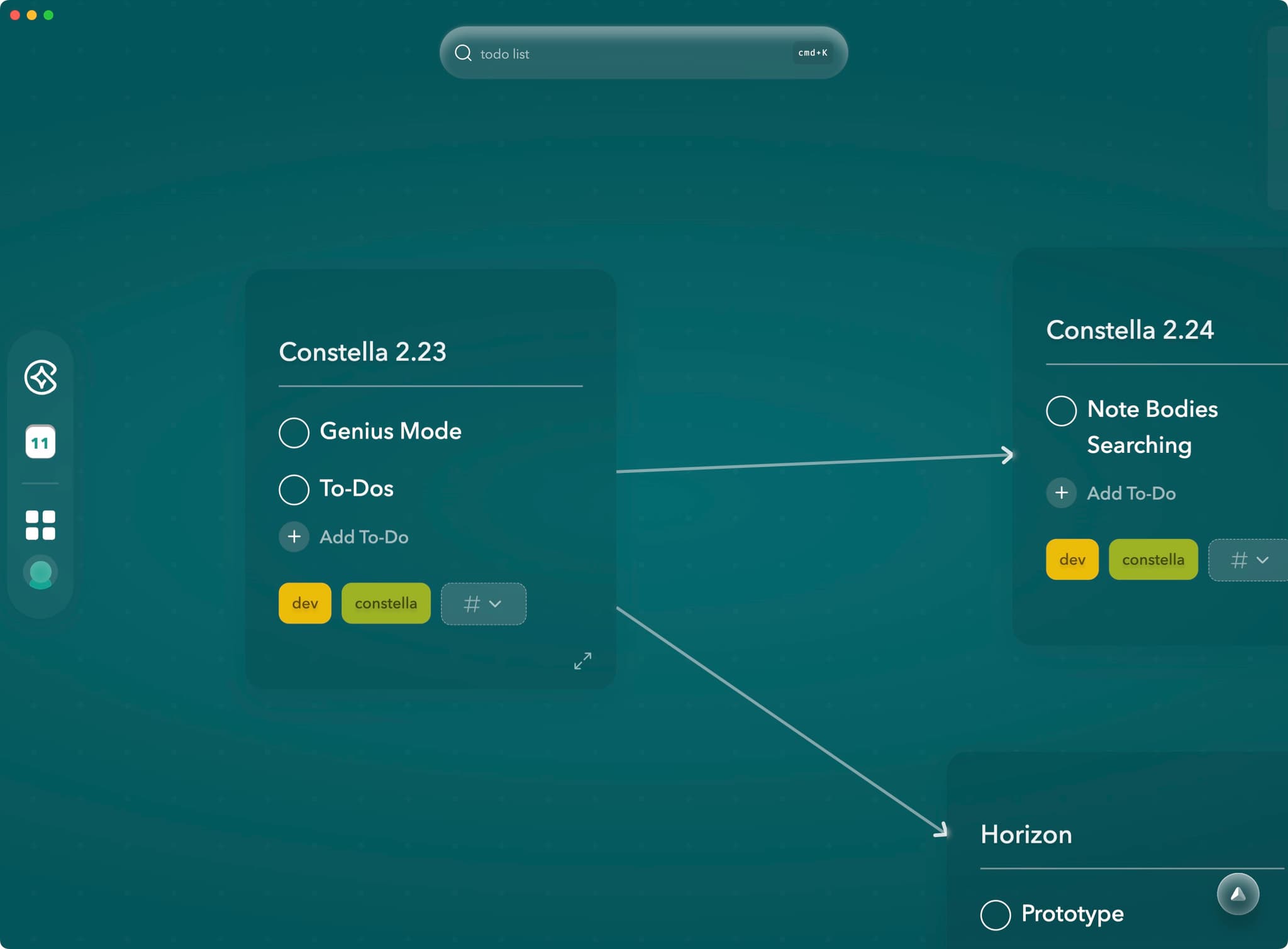
Modern note-taking tools have evolved, embracing a graph-first infinite canvas approach for flexible thought mapping. Unlike traditional document-based editing, this method allows you to visualize and connect your ideas in a dynamic, non-linear fashion. Constella App exemplifies this innovation by offering an infinite canvas where you can freely map out your thoughts and create a visual network of interconnected ideas.
- **Automatic Connection Drawing: **Graph-based note-taking tools automatically draw connections between related notes, saving time and enhancing insight generation. Constella App uses AI to detect and link relevant notes as you type, ensuring well-organized and accessible ideas.
- **Role of AI Assistants: **AI assistants in note-taking apps facilitate logical reasoning and task completion by analyzing notes and suggesting connections. Stella, the AI assistant in Constella App, leverages connected notes to provide logical responses and assist with tasks, ensuring relevant information is always accessible.
Incorporating features like an infinite canvas for thought mapping, automatic connection drawing, and AI assistance significantly boosts productivity. Whether you're using an Android note app or looking for an app to keep track of ideas, these innovations make modern note-taking tools indispensable for efficient idea management.
Introducing Constella App: The Next-Level Note-Taking Solution
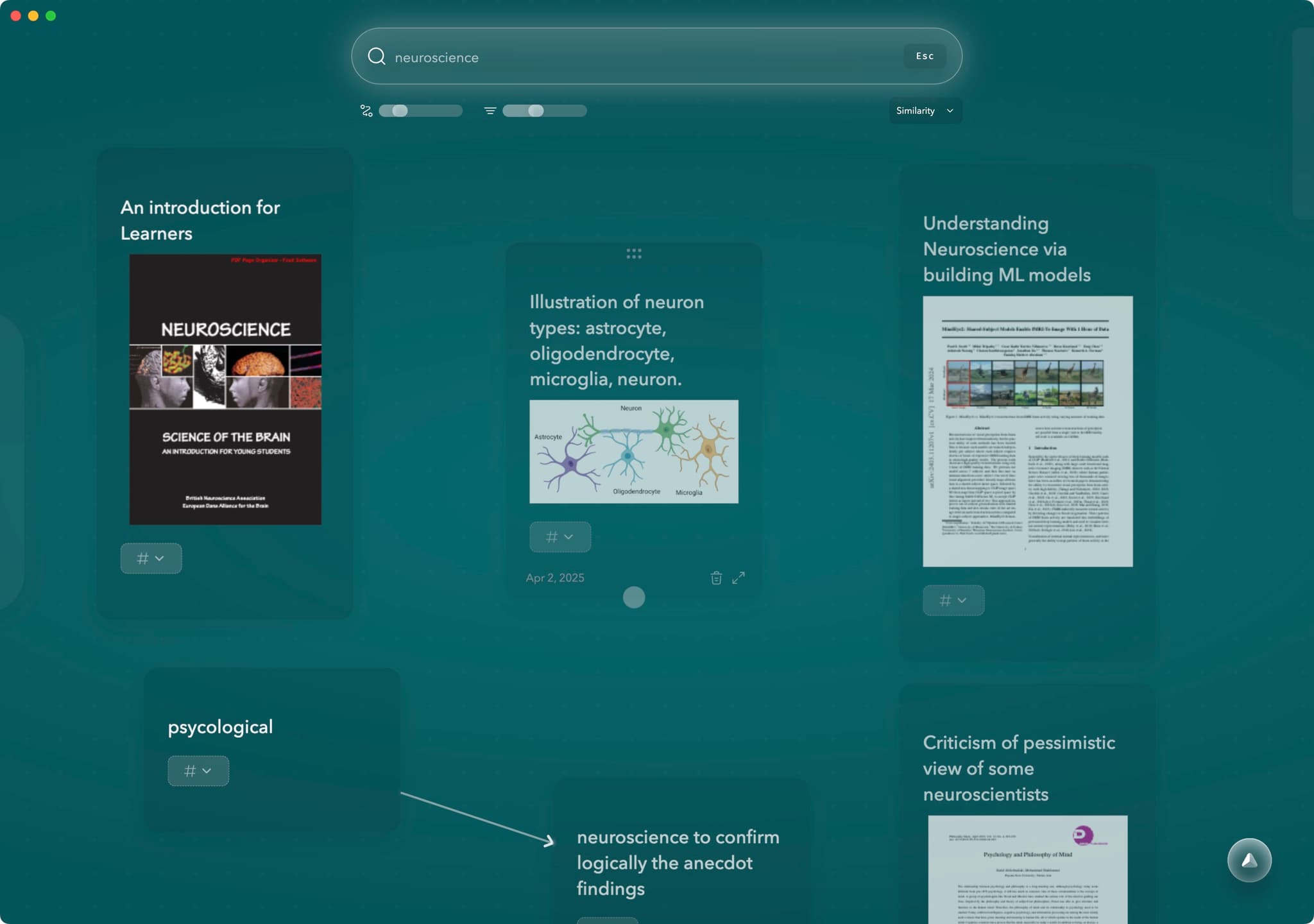
Constella App brings a new dimension to digital note-taking by merging AI-driven intelligence with a visual, graph-based structure. Designed as an AI-powered personal knowledge manager, Constella aims to prevent thought loss and help you make the most of every idea, insight, or inspiration that crosses your mind.
Key Features That Set Constella Apart
- **Smart Retrieval: **Experience instant recall of relevant notes as you type. Constella’s AI note taker understands context and surfaces connections on the fly—no complex tagging or folder hierarchies required.
- **Visual Graph Interface: **Navigate your knowledge visually with an infinite canvas. Drag-and-drop connections allow you to map thoughts naturally, mirroring how your brain organizes information. Notes become nodes in a living network rather than static files lost in a list.
- **Effortless Connectivity: **Simply drag one note onto another to create instant relationships. You shape your own mind map without tedious manual linking.
- Stella AI — Stella AI continuously analyzes your knowledge base, surfacing hidden connections and highlighting gaps—helping your ideas evolve faster and avoid stagnation.
- Quick Capture — Capture text, voice, or images instantly from desktop or mobile; everything syncs seamlessly into your graph, ensuring no valuable idea is lost or delayed.
- Daily Jotting View— A dedicated view encourages daily writing and reflection, giving you a frictionless way to test ideas, review emerging insights, and refine your thinking in real time.
Adapting to the way you think and work, Constella App minimizes forgotten notes by surfacing what’s relevant at just the right moment. The result is a visual graph-based note app that transforms scattered information into actionable knowledge—making it an essential upgrade for anyone serious about efficient idea management.
Conclusion
Choosing the best way to take notes for work means adapting to how your brain actually thinks—visually, contextually, and non-linearly. Modern solutions like Constella App integrate AI-powered assistance with a visual knowledge graph, making note-taking smarter and more intuitive. This combination removes barriers between your ideas, allowing them to connect and grow.
Audit your current note-taking system using these quick checks:
- Forgotten notes piling up with no easy recall
- Poor searchability or endless scrolling
- Siloed thoughts that never connect
- Frustration capturing ideas in fast-paced environments
If you spot any of these red flags, it’s time for a note-taking system upgrade. Don’t let outdated tools limit your creativity or productivity. Explore advanced options that align with the way your mind operates—networked, flexible, and intelligent. Give yourself the freedom to capture every idea and retrieve insights when you need them most. Start your upgrade today.
FAQs (Frequently Asked Questions)
Why is effective note-taking crucial for productivity and idea management at work?
Effective note-taking enhances productivity by helping you capture, organize, and manage ideas efficiently. It prevents loss of important information and supports better decision-making and insight development, which are essential for successful work outcomes.
What are common challenges faced with traditional and digital note-taking systems?
Traditional and many digital note-taking systems often suffer from limitations such as linear structures that don't match how our brains process information, siloed notes leading to forgotten ideas, difficulty in fast capturing during meetings, and poor categorization causing loss of valuable insights.
How can I recognize signs that it's time to upgrade my current note-taking system?
Signs include frequent frustration during fast-paced meetings or lectures due to slow capture speed, inability to keep up with new ideas efficiently, losing important information because of poor organization, and feeling limited by your system's structure or search capabilities.
What key features should I look for in a modern note-taking app to boost my productivity?
Look for quick capture capabilities supporting multiple input types like text, voice, and images; advanced search functions that instantly surface relevant notes; visual graph-based interfaces allowing flexible thought mapping; and AI-powered tools that assist in logical reasoning and task completion based on connected knowledge networks.
How do graph-based and AI-powered tools revolutionize the way we take notes?
Graph-based tools provide an infinite canvas that mirrors how our brains connect concepts, enabling flexible thought mapping. AI-powered features automatically draw connections between related notes, enhance insight generation, assist in logical reasoning, and help complete tasks by leveraging connected knowledge networks.
What makes Constella App a next-level solution for note-taking at work?
Constella App combines AI-powered personal knowledge management with a visual graph interface. Features like Smart Retrieval allow instant recall as you type, while the drag-and-drop visual graph enables effortless connection of notes on an infinite canvas, preventing thought loss and boosting idea retention and work efficiency.
Want more insights like this?
Subscribe to get short productivity tips and useful summaries of new tools every week.
Want more insights like this?
Subscribe to get short productivity tips and useful summaries of new tools every week.


