
7 Features Heptabase Lacks That This Tool Has
Heptabase, with its focus on visual tools like whiteboards, mind maps, and PDF annotation, caters primarily to visual learners and beginners in the field of Personal Knowledge Management Systems (PKMS). Its block-based organization system and AI integration offer users an interactive way to manage notes. On the other hand, Constella.App emerges as a more comprehensive knowledge management app. It meets user demands for advanced features by addressing limitations found in other apps like Heptabase.
Finding the perfect note-taking and knowledge management app can be like finding a needle in a haystack. While Heptabase offers robust features for visual thinkers and project managers, Constella.App brings next-level AI features that make it more intuitive and interactive. From its real-time AI-powered Jotting View to the infinite visual graph, Constella stands out for capturing, connecting, and evolving ideas in ways Heptabase doesn’t. Here’s a closer look at the unique features that make Constella a standout option.
Understanding Heptabase
Heptabase Features
Heptabase is a flexible tool designed for visual note-taking and managing personal knowledge. It offers various features such as whiteboards, mind maps, and PDF annotation to accommodate different learning and organizational methods. These tools provide users with a versatile platform to effectively visualize their thoughts and ideas.
- **Whiteboards: **Whiteboards provide an unrestricted area for brainstorming, enabling users to visually illustrate connections between concepts.
- **Mind Maps: **Mind Maps promote organized thinking by allowing the creation of hierarchical diagrams that depict relationships between various subjects. Mind mapping is a powerful technique that not only organizes information visually but also enhances creative thinking and brainstorming.
- **PDF Annotation: **PDF Annotation facilitates in-depth study sessions by permitting users to highlight, comment, and annotate directly on PDFs, simplifying the management of academic or professional reading materials.
Key Limitations of Heptabase
1. AI-Driven Jotting View
Constella’s AI-assisted Jotting View is built for capturing fleeting ideas, making it easy to jot down quick thoughts and create connections on the fly. Unlike traditional jotting tools, Constella’s AI actively suggests related notes as you type, so you never lose track of potential links between ideas.
- Quick Capture for Fleeting Thoughts: Let’s face it, some of the best ideas come at the oddest times. Constella’s jotting view allows you to capture these thoughts immediately, whether it's an idea for a new project or a reminder to look into a concept.
- Real-Time AI Suggestions: As you type, the app’s AI identifies related notes and pops them up beside your current note. This proactive linking minimizes the need to search through old notes, making it incredibly efficient for brainstorming sessions or research projects where ideas need to connect organically.
- Intuitive Flow: Unlike Heptabase’s more rigid jotting approach, Constella’s jotting view is designed to feel like an extension of your thought process, keeping the focus on creativity rather than manual organization.
Where Heptabase falls short: Heptabase doesn’t offer an AI-driven jotting feature. While it has traditional note-taking options, its functionality lacks the spontaneous, dynamic nature that Constella brings to jotting.
2. Infinite Visual Graph for Expansive Connections
Constella’s infinite visual graph adapts in real time, making it ideal for users who think non-linearly or need a large space to explore complex ideas. This graph is more than just a note map—it visually adjusts to fit your expanding thoughts, offering a truly unlimited workspace.
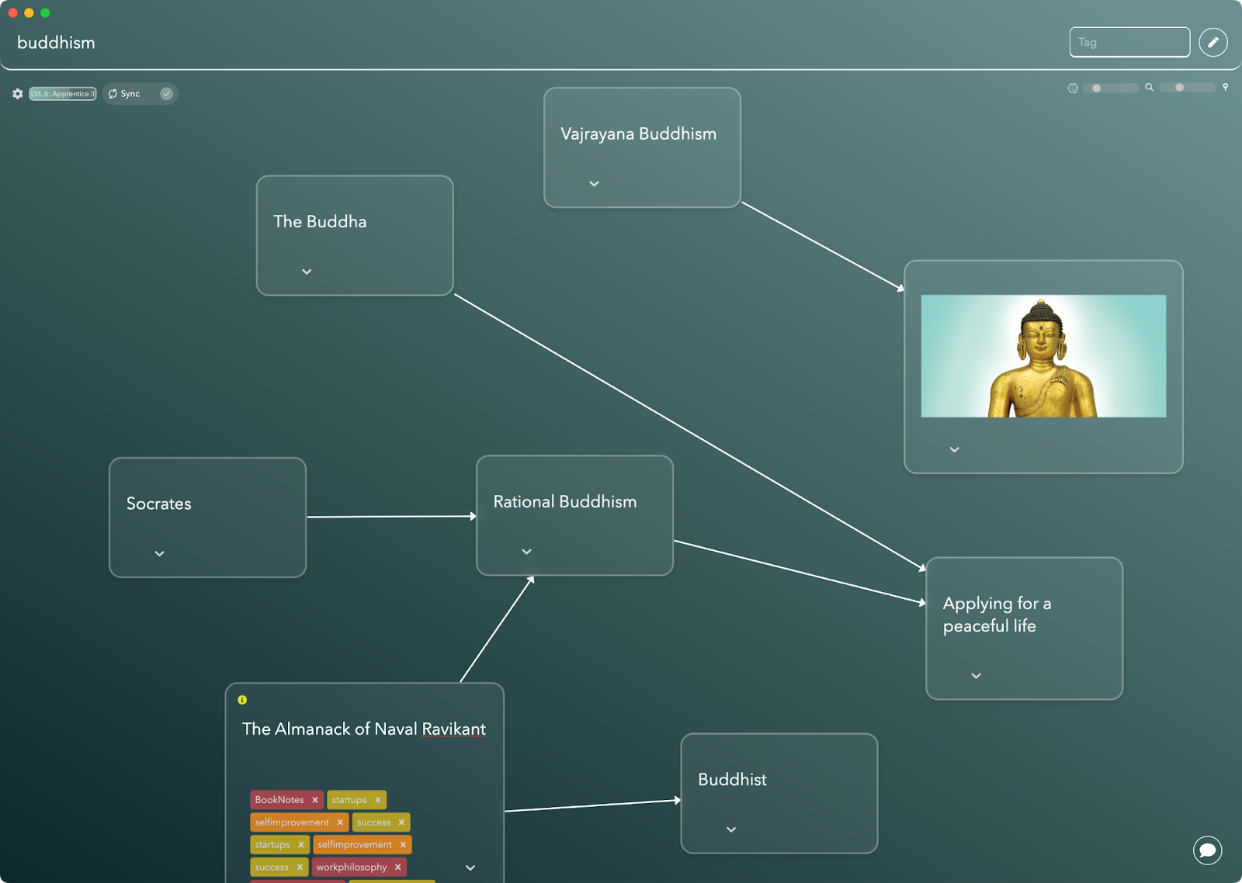
- Dynamic Layout: As you add more content, the infinite graph expands, keeping everything visually connected without feeling cluttered. This adaptable layout means that no matter how much you add, the graph intuitively reorganizes to keep related notes within view.
- Visual Insight: Constella’s graph lets you see how ideas connect in a way that text-based notes can’t match. It’s perfect for complex projects, allowing you to spot connections and gain insights by viewing relationships between different ideas.
- Support for Non-Linear Thinking: Whether you’re brainstorming, developing a creative project, or mapping out research, the infinite graph gives you a flexible space to explore without constraints. Traditional mind-mapping tools can feel limited in comparison since they’re usually linear or require manual reorganization.
Heptabase’s limitation: While Heptabase includes visual mapping through its whiteboards, these boards are more rigid. They don’t dynamically adjust as new connections form, making them better suited for structured projects rather than expansive idea exploration.
3. Stella: The AI Chat Assistant
Stella is Constella’s built-in AI assistant, designed to help you search, organize, and connect content across projects. By simply asking Stella to surface certain information or organize notes, users can find what they need without extensive manual searches.

- Intelligent Content Search: Need to find that one note buried in a sea of information? Stella’s search function allows you to pull up specific notes or tags quickly, saving you the hassle of going through folders or lists.
- Organizational Assistance: Stella can suggest ways to categorize and group notes based on patterns in your content, so it’s easier to manage large projects. It’s like having a personal assistant who knows where everything is.
- Conversational Interface: With Stella, managing notes feels more like chatting with a colleague than combing through a complex system. You can even ask Stella to pull notes together for a project or suggest connections between ideas based on past notes.
What’s missing in Heptabase: Heptabase doesn’t include an AI assistant. Without a tool like Stella, users have to rely on manual organization and search, which can be time-consuming in larger projects.
4. Cross-Device Syncing with Saved Views
Constella allows users to save customized views that sync across all devices. This feature means you can set up specific layouts or note configurations and have them look exactly the same whether you’re on your phone, tablet, or desktop.

- Saved Configurations: Save different configurations for different types of projects, like a particular layout for research notes or a dedicated setup for daily planning. No need to reorganize every time you switch devices.
- Seamless Transitions: Since Constella retains your exact view preferences, it’s easy to pick up exactly where you left off without adjusting for a new screen. This is especially helpful for users who switch between devices frequently.
- Device Flexibility: Whether you’re working on mobile or desktop, Constella offers a consistent experience, so you don’t have to spend time reorienting or searching for the right notes.
Heptabase’s shortfall: While Heptabase does offer device syncing, it lacks saved, personalized views. This limitation means users may have to adjust settings when moving between devices.
5. Enhanced Tagging and Smart Search
Constella’s tagging and search options make categorizing and finding notes simple. With tagging by keywords and hashtags, users can create specific filters and views to locate exactly what they need.

- Flexible Categorization: Use tags and hashtags to organize notes by specific projects, themes, or categories. This setup is perfect for keeping work and personal projects separate or creating a tagging system that fits your workflow.
- Advanced Search Options: Constella’s search function allows for refined filtering, meaning you can search by tag, keyword, or even filter by specific project categories. This makes it easy to zero in on notes you need quickly.
- Intuitive Navigation: Smart search options and tagging allow users to navigate through even the most extensive databases with ease, a major advantage over simple search functions.
Heptabase comparison: Heptabase includes tagging within its system but doesn’t offer the same level of personalized filters or intelligent search options, limiting its flexibility.
6. Intelligent Tagging and Real-Time Note Surfacing
With intelligent tagging, Constella resurfaces notes relevant to the topic at hand. This lets you rediscover connections between ideas you might have otherwise missed, making it ideal for ongoing projects or for sparking new insights.
- Automatic Resurfacing of Related Notes: As you type, Constella automatically brings up notes relevant to the current topic, providing seamless access to past insights and helping maintain context within your project.
- Dynamic Connections: By surfacing relevant notes in real time, Constella enables you to see associations across your content, encouraging deeper engagement and understanding.
- Improved Workflow: This feature reduces manual searches and encourages users to explore content they may have forgotten, keeping ideas fresh and connected.
Where Heptabase lacks: Heptabase supports linking notes and creating connections, but it doesn’t automatically resurface related notes. Users must manually search for or create links between notes, which can be time-consuming in larger projects.
7. Real-Time Jotting View for Connected Note-Taking
Constella’s jotting view is highly contextual, allowing users to jot down quick notes while relevant information pops up beside them, connecting ideas without interrupting the flow of thought.

- Instant Contextual Suggestions: As you write, Constella’s AI suggests related notes that appear on the side, creating a seamless connection between ideas.
- Effortless Linking of Ideas: No need to manually search for associated notes; they appear automatically, letting you build out thoughts without losing focus.
- Perfect for On-the-Go Ideation: Ideal for capturing ideas in motion, where the immediate context can spark further insights without slowing down the jotting process.
Heptabase’s approach: Heptabase’s jotting tools, while effective, are more limited in terms of real-time connections and AI support, making them less conducive to spontaneous, associative note-taking
Exploring Constella.App as a Robust Alternative to Heptabase
Constella.App Features
As an innovative note-taking application, Constella.App stands out by addressing the limitations found in tools like Heptabase. It offers unique capabilities that redefine how users engage with their notes and manage knowledge. Through features such as the infinite visual graph and AI-driven functionalities, Constella.App provides a robust platform for users seeking a holistic solution.
Smart Search Capabilities for Efficient Information Retrieval
Constella.App shines with its smart search capabilities, enabling efficient retrieval of information across extensive databases. This function is pivotal for users managing vast amounts of data or complex projects.
The benefits of smart search capabilities include:
- Instantaneous Access to Notes: Users locate relevant information quickly, even within large datasets, minimizing downtime during research or brainstorming sessions.
- Enhanced Productivity: With smart search, time spent sifting through irrelevant data decreases significantly, allowing for more focus on critical tasks.
In essence, Constella.App redefines what it means to utilize a note-taking application by integrating AI-driven elements and visually dynamic tools that cater directly to user needs. As a compelling alternative to Heptabase, it sets a new standard in knowledge management solutions.
This shift towards more efficient personal knowledge management is reflective of broader trends in Personal Knowledge Management (PKM), where individuals are increasingly seeking tools that not only organize but also optimize their information usage.
However, it's essential to avoid common pitfalls when setting up these systems or during the note-taking process. Understanding the top mistakes people make when note-taking or the seven mistakes to avoid when setting up your PKMS can greatly enhance your experience with these tools.
Conclusion: Choosing the Right Tool for Your Note-Taking Needs
When deciding between Heptabase and Constella.App, it's crucial to consider the specific needs of your workflow. Heptabase has been a reliable choice for users who prefer visual learning tools with features like whiteboards, mind maps, and PDF annotations. However, it lacks several advanced functionalities that Constella.App offers.
A Revolutionary Approach with Constella.App
Constella.App excels with its AI-driven Jotting View, allowing for quick idea capture while maintaining context. It may face challenges due to its newer ecosystem lacking some integrations found in older tools like Heptabase. However, it offers a next-generation note-taking approach with an infinite graph for recalling past thoughts. Choosing between these tools depends on personal needs. For cutting-edge technology and efficient organization, Constella.App is a compelling alternative to traditional solutions.
FAQs (Frequently Asked Questions)
What are the main limitations of Heptabase compared to Constella.App?
Heptabase lacks several key features such as bidirectional linking, extensive plugin support, local file storage options, advanced search functionality, real-time collaboration, version history tracking, and minimal third-party integrations. These limitations can hinder users seeking a comprehensive knowledge management solution.
How does bidirectional linking enhance knowledge management?
Bidirectional linking allows users to create connections between notes in both directions, facilitating nonlinear thinking and better organization of information. This feature is particularly emphasized in tools like Obsidian, which provides a more robust framework for managing complex ideas.
What unique features does Constella.App offer that improve note-taking efficiency?
Constella.App features an AI-driven jotting view for quick note capture and an infinite visual graph for organizing thoughts. Additionally, it includes smart search capabilities that enable users to retrieve relevant notes instantly, making it a superior choice for productivity.
Why is local file storage important in note-taking applications?
Local file storage offers users control over their data and eliminates concerns related to cloud sync issues. It caters to user preferences for data management and security, which are not adequately addressed by Heptabase as it primarily relies on cloud storage.
Can you explain the significance of real-time collaboration in modern note-taking tools?
Real-time collaboration is crucial for teamwork and productivity in note-taking applications. It allows multiple users to work on notes simultaneously, enhancing communication and efficiency. Tools like Scrintal provide this feature, which is absent in Heptabase.
What should users consider when choosing between Heptabase and Constella.App?
Users should evaluate their specific needs regarding features such as bidirectional linking, plugin support, collaboration capabilities, and data storage preferences. Constella.App is often favored due to its advanced functionalities like AI-driven jotting view and enhanced tagging system that cater to comprehensive knowledge management.
Want more insights like this?
Subscribe to get short productivity tips and useful summaries of new tools every week.
Want more insights like this?
Subscribe to get short productivity tips and useful summaries of new tools every week.


